Just say the word: Rebuilt pronunciation controls in Synthesia
Speak a word once, hear it back before you save, and apply it everywhere — with a Glossary that works across your workspace.
See what Synthesia can do for you
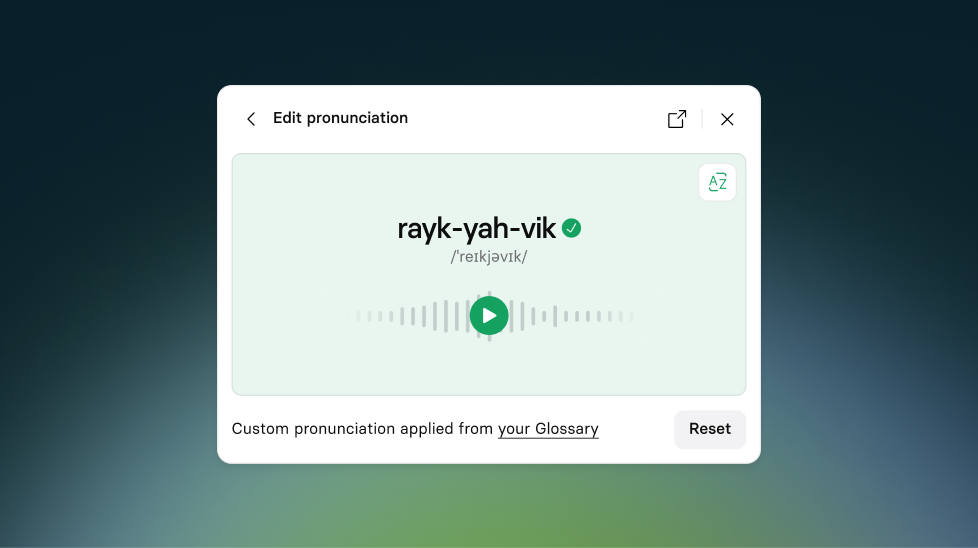
Today, we're releasing our rebuilt pronunciation controls — a ground-up rethink of how pronunciation works in Synthesia. You can now speak a word once to set its pronunciation, preview how it sounds before saving, apply it across your entire video in one click, and save it to a Glossary that works across every voice in your workspace automatically. Available now on all plans.
Why we rebuilt it
Pronunciation has been one of the most persistent sources of frustration in Synthesia. The old system asked you to type phonetic spellings and guess at the output — and even when you got it right in one scene, it wasn't guaranteed to sound the same in the next. The Glossary only worked for one voice at a time, meaning teams had to repeat the process every time they switched avatars.
For teams whose videos depend on getting a company name, product, or acronym right — this wasn't good enough. So we rebuilt it to allow you to set a pronunciation once, trust it every time, and eliminate time wasted trying to get a single word right.
What's new
- Speak to set a pronunciation. The fastest way to get a pronunciation right is to say it yourself. Open the pronunciation menu on any word, hit record, say the word, and the system handles the rest — no phonetic spellings, no guessing. Preview the result before you commit, and re-record if you want to try again.
- Type a pronunciation with consistent output. The typing input is still there, now producing more consistent results across supported voices than before.
- Preview before you save. Every pronunciation — whether you spoke it or typed it — goes through a preview step before it's saved. Hear exactly how the word will sound before it's applied anywhere. No more generating a full video to discover a word still sounds wrong.
- Bulk apply in one click. Once you're happy with a pronunciation, apply it to every instance of that word across your entire video at once.
- A Glossary that works across your whole workspace. Pronunciations saved to the Glossary now apply automatically across all voices in a language — not just the voice you set it on. The next time anyone on your team types that word, it gets the right pronunciation automatically. From the Glossary page, you can also scope a pronunciation to a specific locale (like British English) or a specific voice if needed.
Note: Pronunciation controls work with all voices, but some are better than others. If you're using a voice where reliability is more limited, you'll see a notice in the pronunciation menu with the option to switch. We're actively expanding support to expressive voices in Spanish, French, and German.
To learn more about how pronunciation controls work, check out our documentation.
More updates

Introducing Roleplay Sessions: you don't learn by just watching, you learn by doing
Most training stops at telling people what to do. Roleplay Sessions lets them actually do it - practice, coaching, and measurable skill gains, built into the platform trusted by 90% of the Fortune 100.
.png)
Get the skills, insights, and support to help you scale