New Feature
Avatar Builder
Easily customize your avatar's outfits with your brand colors and logos to align with your brand.

See what Synthesia can do for you
See all updates
We're thrilled to introduce Avatar Builder.
Easily customize your avatar's outfits with your brand colors and logos to align with your brand. Use it to create relatable avatars for organizational changes, global team training, or IT security training, all while showcasing your brand's identity.
What's New?
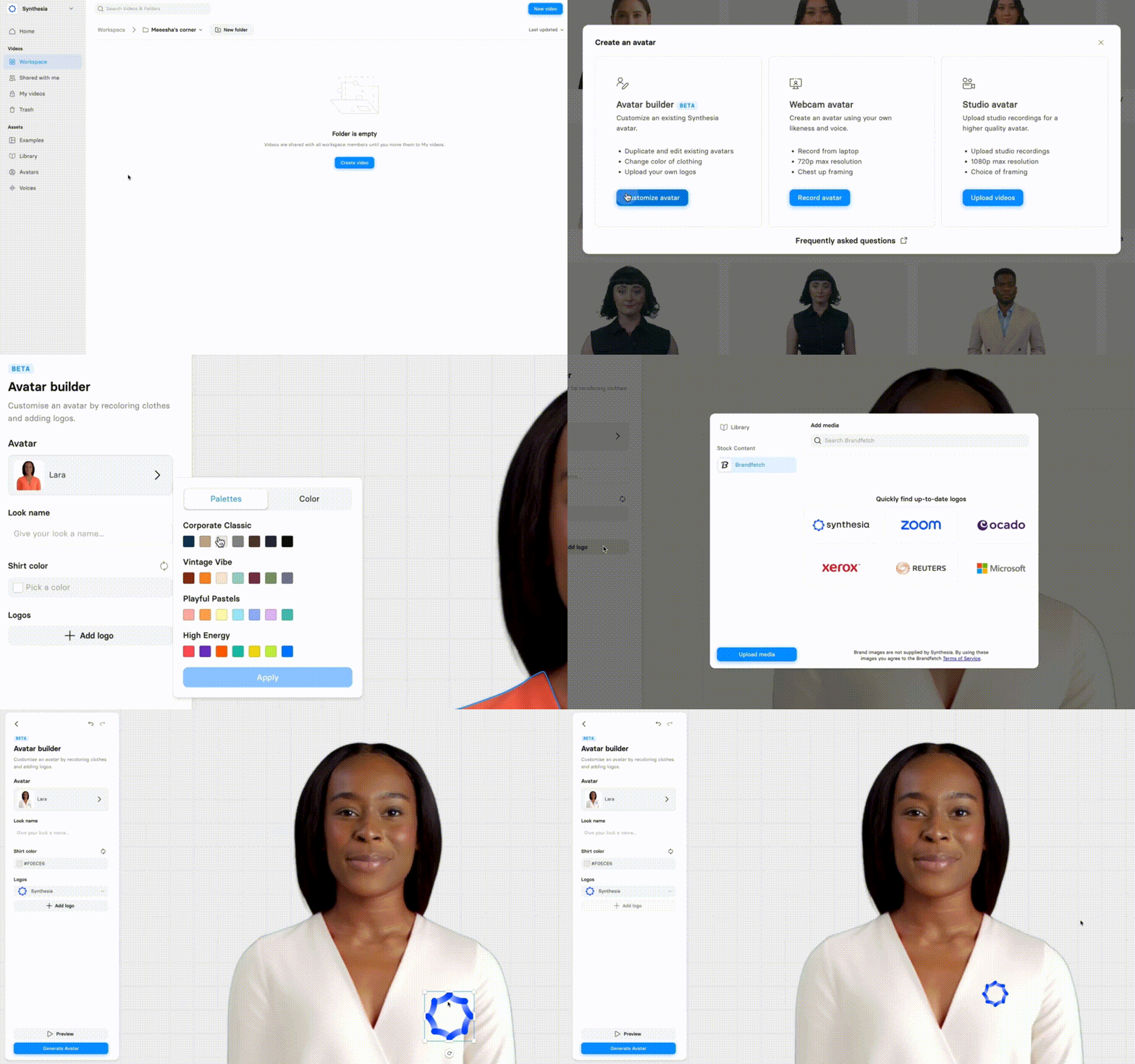
- Customize Clothing Color: Enjoy the freedom to mix and match! You can change the colors of various clothing items like t-shirts and suits independently.
- Add Your Logo: Brand integration is now a breeze with Brandfetch. You can place your logo on any layer of your avatar's clothing.
Things to know:
- Logo addition is only available for corporate plan users.
- Available for 20 Avatars Only: This includes Alex, Anton, Axel, Carla, and many others.
- Not for Custom Avatars: At present, custom avatars are not supported.
How to Use:
To start, go to Avatars > Create Avatar > Avatar Builder > Choose and name your avatar > Change clothing color > Add logo > Generate > Start using!
Check the GIF to understand how it works:
Get the skills, insights, and support to help you scale





