Create any images with FLUX.2 & Nanobanana Pro
We just added image generation to Synthesia. Try the latest genAI models — they’re awesome!
See what Synthesia can do for you
What’s new
You can now generate custom image assets directly in Synthesia — no need to leave the Editor. Just type what you need, and use images in your videos.
Why it’s cool
All in one app: No more jumping between tools or tabs to find the right image.
Generate infographics: FLUX.2 and Nano Banana Pro understands text perfectly — great for data visuals and explainer content.
Stay on brand: Create consistent, cinematic visuals that match your tone and story. Just remember to use colour codes when prompting.
How it works
- Open the
Media panel→ Create with AI tab Typeyour prompt (or press Tab to auto-generate one)Picka model:- FLUX.2 – 0 credits per image for Enterprise plan, 3 credits per image for Creator and Starter plan
- Google Nanobanana Pro – 9 credits per image (~$0.15)
Reviewyour generated image — it automatically saves to your media library so you can reuse it anytime.
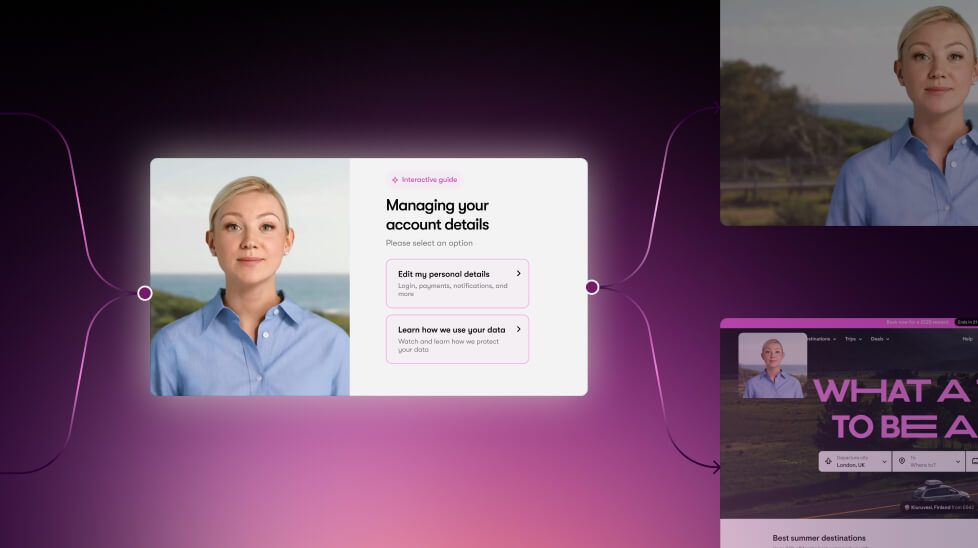
Make your videos interactive
We're super excited to introduce Interactivity to our enterprise customer and Creator plan users—now you can add clickable CTAs and branching scenarios right inside your video.

Get the skills, insights, and support to help you scale





