Editing in the script box: AI video assistant 3.0
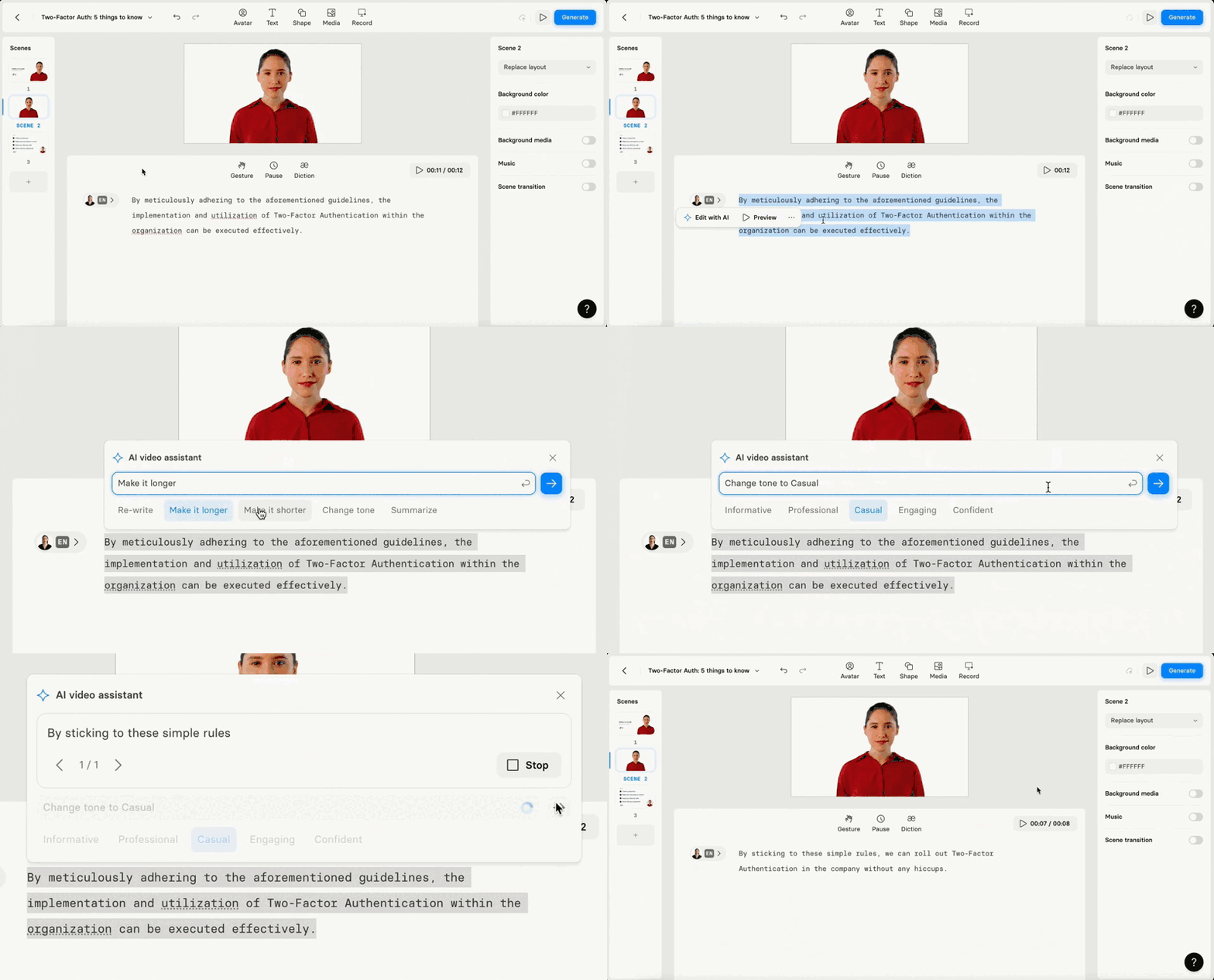
AI video assistant 3.0 allows you to edit and refine text in the script box: rewrite, optimize length, adapt tone, or summarise.

See what Synthesia can do for you
We're excited to share the latest update to our Synthesia platform: AI video assistant 3.0. This feature allows you to edit and refine text in the script box.
What you can do?
Rewrite: use to check your word choices and fix it.
Optimize length: make the script shorter or longer.
Adapt tone of voice: make your script sound informative, professional, casual, engaging or confident.
Summarise: highlight key points from the text you entered.
Why it's cool?
You can transform any text into a well-crafted script. You don't need skills to create a video that sounds great.
How to Use AI Video Assistant 3.0:
Open the video:create the new one or the one you've edited already. Make sure you have some text on the scene.Highlight any part of the script- Click
Edit with AI:re-write text, make it longer or shorter, change tone of voice (casual, professional, friendly, etc) or summarise. - Check the result. If you are happy with it,
replacethe original text orregenerate it
Adapt any text you have into a script that engages people and makes them want to listen.
Happy creating!
Live Collaboration: co-edit, comment, share
We are happy to introduce Live Collaboration to our corporate plan users. This feature transforms how teams create videos together.
Get the skills, insights, and support to help you scale





