Improvement
Share avatar outfits and spaces
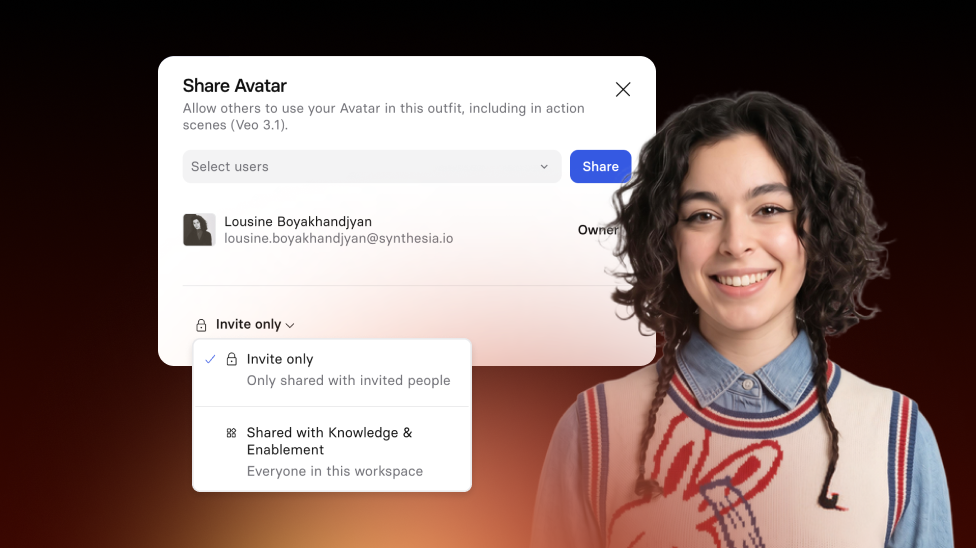
Share customizable Avatar outfits and Spaces with your teammates—or your whole workspace.
See what Synthesia can do for you
See all updates
Today, we’ve introduced Outfit and Space sharing, so teams can reuse customizable avatar Outfits and Spaces without rebuilding them from scratch. Available on Enterprise plans.
How it works
To share it with a specific user, or several users:
- Open up the 3-dot menu and select
Share. - Type the names of the users you'd like to share it with in the
Select usersfield, or click on the dropdown button for that field to find them in a list of workspace users. - Click the
Sharebutton next to theSelect usersfield to share your avatar.
To share it with the entire workspace:
- Open up the 3-dot menu and select
Share. - In the bottom-left of the Share menu, click on the
Invite onlydropdown. - Select the
Shared withYour Workspace Nameoption.
The result: faster and more consistent video content creation.
For more details, check out our documentation.
Get the skills, insights, and support to help you scale





