New Feature
Introducing: AI Video Assistant
Upload a document or paste a link, and transform it into an eye-catching video with our new AI video assistant.

See what Synthesia can do for you
See all updates
Exciting end-of-the-year release update — we are thrilled to introduce the AI video assistant.
What It Does: Upload a document or paste a link, and transform it into an eye-catching video.
Why It's Fabulous: Turn lengthy, dull documents or blog posts into vibrant videos. Perfect for jazzing up reports, making blogs more engaging, and amplifying your message with visual flair.
How to Craft a Standout Video:
- Objective: Establish a clear goal for your video.
- Audience: Identify your target audience.
- Language: Choose the language of the video.
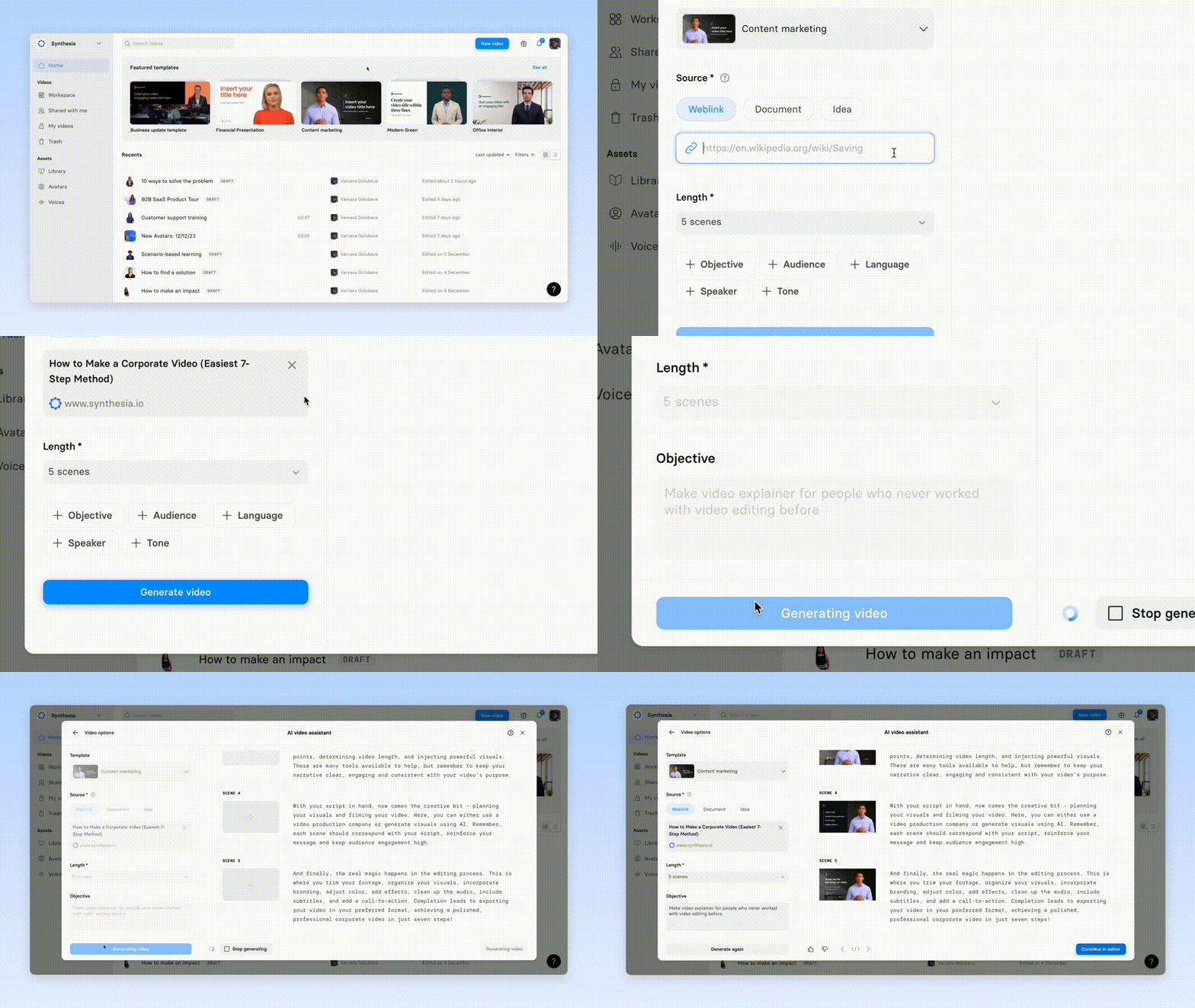
Quick Steps to Use:
- Hit
New Video. - Proceed to
AI video assistant - Choose a pre-designed template for your video
- Upload the document or enter the link.
- Customize and refine your video's content
Additional Info to Know:
- File Size Limit: Ensure your document is less than 5MB.
- Supported Formats: Upload .pdf, .doc, .docx, or .txt files.
Get the skills, insights, and support to help you scale





