Introducing: AI Video Assistant
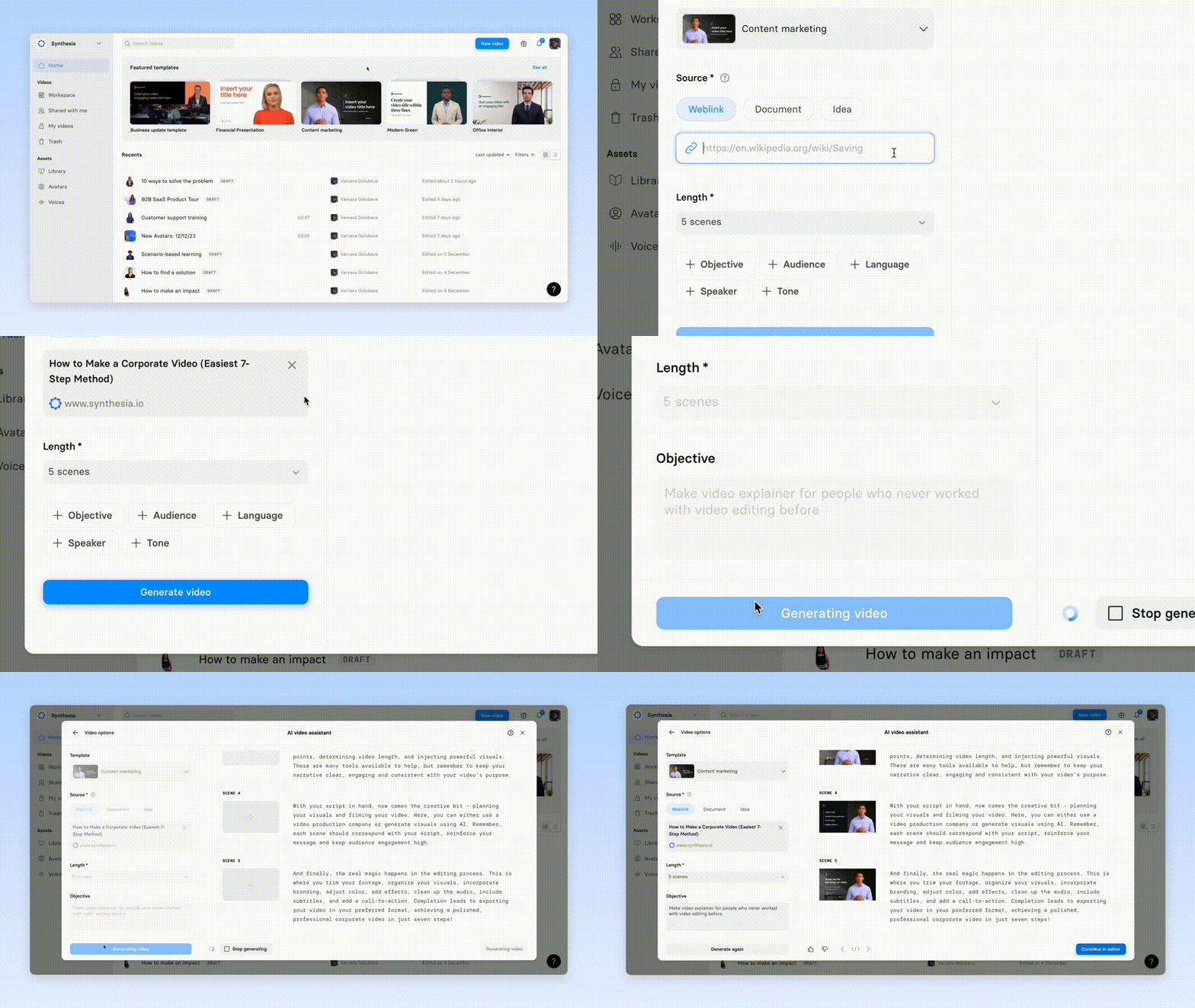
Upload a document or paste a link, and transform it into an eye-catching video with our new AI video assistant.

See what Synthesia can do for you
Exciting end-of-the-year release update — we are thrilled to introduce the AI video assistant.
What It Does: Upload a document or paste a link, and transform it into an eye-catching video.
Why It's Fabulous: Turn lengthy, dull documents or blog posts into vibrant videos. Perfect for jazzing up reports, making blogs more engaging, and amplifying your message with visual flair.
How to Craft a Standout Video:
- Objective: Establish a clear goal for your video.
- Audience: Identify your target audience.
- Language: Choose the language of the video.
Quick Steps to Use:
- Hit
New Video. - Proceed to
AI video assistant - Choose a pre-designed template for your video
- Upload the document or enter the link.
- Customize and refine your video's content
Additional Info to Know:
- File Size Limit: Ensure your document is less than 5MB.
- Supported Formats: Upload .pdf, .doc, .docx, or .txt files.
More updates
Keep layouts looking polished for your translated videos
Translate videos without text overflow—translations adapt to each text box, and long strings scale down to keep your slides looking polished.
.png)
Get the skills, insights, and support to help you scale





