Trimming UX update
We're excited to share that our new Trimming UX update is now available for all Synthesia users.

See what Synthesia can do for you
We're excited to share that our new Trimming UX update is now available for all Synthesia users.
What's new:
- Split videos: easily divide any uploaded or stock video into segments.
- Create scenes: transform segments into separate scenes.
- Edit freely: modify each segment according to your needs.
- Duplicate & rearrange: copy segments and change their order for optimal storytelling.
Why is this cool?
This update makes editing videos in Synthesia simpler and faster. You can:
Upload a screen recording and split it into scenes for a perfect voiceover.
Choose only the best parts of a stock video to use, and easily cut out the bits you don't need.
Plus, it really cuts down on editing time and makes your workflow much smoother.
How to Use It?
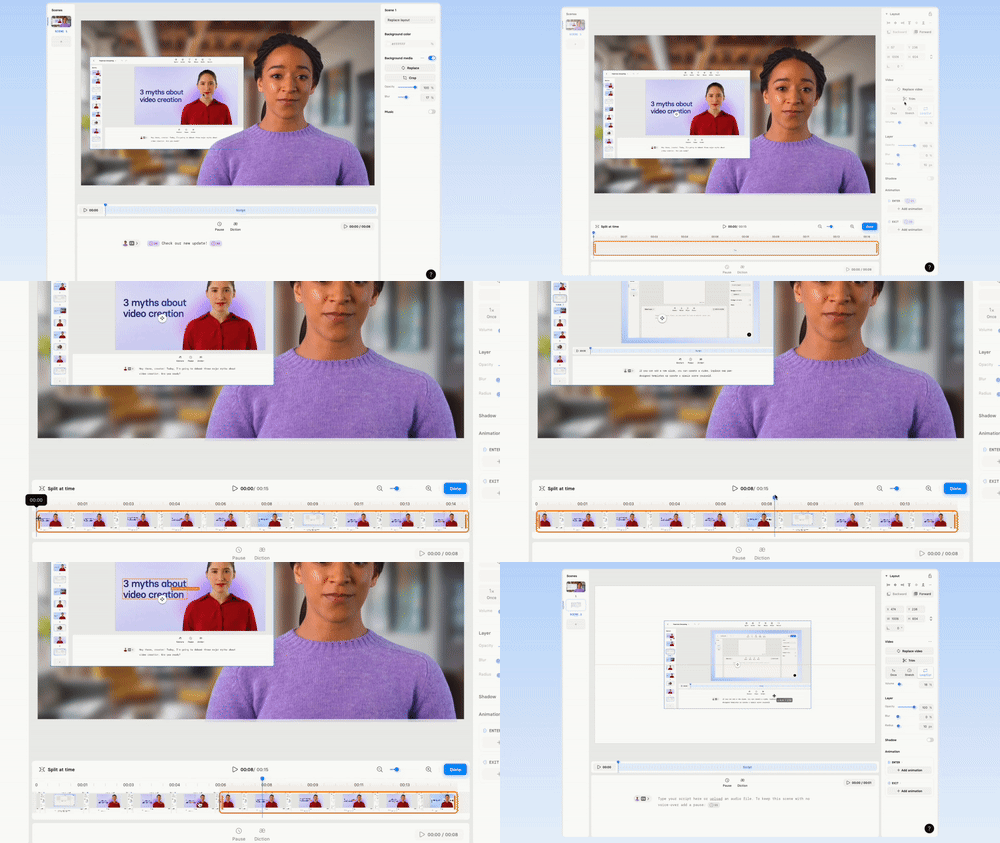
First — select the video and click on Trim.
Splitting: move the slider to where you want to split and click Split at Time.
Moving Segments: just drag and drop it where it needs to be placed.
Creating Scenes: to make a new scene with a piece of the video, right-click on it and select Add to New Scene.
Create videos from PowerPoint with AI Video Assistant
Upload a .pptx to AI Video Assistant to generate a draft script and video, complete with key images and stock visuals—available on Starter, Creator, and Enterprise plans.
Get the skills, insights, and support to help you scale





