New hire onboarding is one of the most discussed topics in people development and one of the easiest to underestimate.
βOnboardingβ can mean anything from a brief company overview to a full week of structured sessions.
That variability is the real challenge: the label stays the same, but the experience β and the outcomes β depend on how mature your operating model is. The goal is a repeatable system with shared ownership, clear handoffs, and lightweight checkpoints that hold up across teams, regions, and working styles.
This guide shows you how to build that.
What weβll cover
- Assessing your current onboarding
- Defining shared ownership
- Setting a new-hire cadence
- Supporting managers
- Using onboarding buddies
- Adding checkpoints
How do you assess your current onboarding?
No matter the size or maturity of your organization, itβs worth revisiting onboarding as a deliberate investment in engagement and retention β and identifying where you can free up capacity by delivering repeatable content in the natural flow of ramping (for example, short tool tutorials and workflow walkthrough videos).
The teams that struggle most tend to treat onboarding as a massive HR project. Some parts of onboarding are HR-owned by design, like HRIS setup, benefits, and compliance. But enablement onboarding only works at scale as a shared operating model: HR can design the system, while managers, IT, and teams own the day-to-day moments that make new hires productive.
Before you redesign anything, map the current onboarding experience. Start with the signals you already have, then look for patterns across cohorts, roles, regions, and teams. Treat this like building a fact base: whatβs happening, where it breaks, who owns the fix, and what needs to change.
What inputs should you gather?
You donβt need a perfect dataset. You need enough signal to separate one-off complaints from repeat issues.
Experience inputs (what new hires and managers say)
- New hire surveys
- Engagement survey cuts for new hires vs. tenured employees
- Onboarding session feedback
- Manager and buddy feedback
- HR Business Partner notes and enablement feedback from the field
Operational inputs (what systems reveal)
- IT/Help desk tickets tied to new hires
- HRIS timestamps (start date β provisioning complete)
- Completion data for required onboarding modules or training
External and informal signals (what people share when itβs unfiltered)
- Glassdoor and similar forums: themes around onboarding, training, support, and management
- Internal channels (Slack/Teams): repeated βwhere do I findβ¦β questions and recurring blockers
Outcome data (what changed as a result)
- Early attrition, segmented by role and team
- Time-to-access and time-to-first-contribution
- Early performance signals (ramp milestones, QA scores, first-cycle reviews)
- Manager confidence at 30/60/90 days
How do you turn signals into patterns?
Once youβve gathered inputs, focus on pattern-finding rather than debate.
- Segment first: cohort, role family, region, manager
- Tag the evidence into a small set of themes: access, expectations, workflow clarity, findability, manager support, learning delivery
- Call the top friction points: the 3β5 issues that show up across multiple sources
- Write the βwhyβ: root cause and failing handoff (who expected what from whom)
- Translate into decisions: checkpoint, owner, enabling asset, or cadence change
Youβre done when you can answer these questions:
- Where do new hires lose time in week one?
- Which parts vary by manager, role, or region?
- Which issues show up in both feedback and operational data?
- Who owns each fix, and what support do they need to deliver it consistently?
- What changes in the next 30 days vs. the next quarter?
Onboarding assessment worksheet + AI prompts (click to expand)
Use the worksheet to capture signals across sources, then use the prompts to synthesize patterns and turn them into owners, checkpoints, and actions.
Step 1: Fill in the worksheet
| Signal |
Source |
Stage |
Theme |
Owner |
Evidence |
Impact |
Action |
Priority |
Due date |
| βI didnβt have access to X until week 2.β |
IT ticket data + Day 7 survey comments |
Preboarding / Week 1 |
Access & tools |
IT (primary), HR (support) |
Avg time-to-access = 6 days; 14 comments mention tool access |
Ramp delays; manager time lost |
Standardize provisioning checklist + batch provisioning for cadence starts |
High |
|
| βIβm not sure what success looks like.β |
Day 7 survey + manager 1:1 notes |
Week 1 / Weeks 2β4 |
Expectations |
Manager (primary), HR (support) |
Theme appears in 9 survey responses across 3 teams |
Lower confidence; misaligned priorities; rework |
Add βrole outcomes + first contributionβ checkpoint; publish examples of βgoodβ |
High |
|
| Repeated questions about where to find templates/process docs |
Slack/Teams search + onboarding Q&A logs |
Week 1 / Weeks 2β4 |
Findability |
HR/L&D (primary), Team leads (support) |
Top 20 repeated questions point to βwhere is X?β |
Lost time; inconsistent answers; knowledge silos |
Create a single onboarding hub + βwhere answers liveβ module |
Medium |
|
| βOnboarding depends on who your manager is.β |
Engagement survey verbatims + HRBP notes |
All stages |
Consistency |
HR (primary), Managers (support) |
Consistent sentiment across multiple cohorts |
Uneven ramp; inequity; higher attrition risk |
Define manager onboarding expectations + provide just-in-time manager resources |
High |
|
| Early attrition spike in first 90 days |
HRIS / retention data |
0β90 days |
Retention |
HR/People Ops (primary), Business leaders (support) |
0β90 day attrition higher in specific roles/locations |
Hiring cost; productivity loss; manager churn |
Segment drivers (access, expectations, manager support) and address top 3 |
High |
|
| New hires miss key sessions or get different versions |
Attendance logs + session feedback |
Day 1 / Week 1 |
Delivery |
HR/L&D (primary), Facilitators (support) |
Attendance varies; feedback notes βtoo much at onceβ |
Information overload; inconsistent baseline knowledge |
Shift repeatable content to on-demand modules; keep live time for Q&A + coaching |
Medium |
|
Step 2: Use AI to synthesize patterns
- Themes: βGroup these worksheet rows into 5β7 themes. For each theme: frequency, affected stages, and likely root cause.β
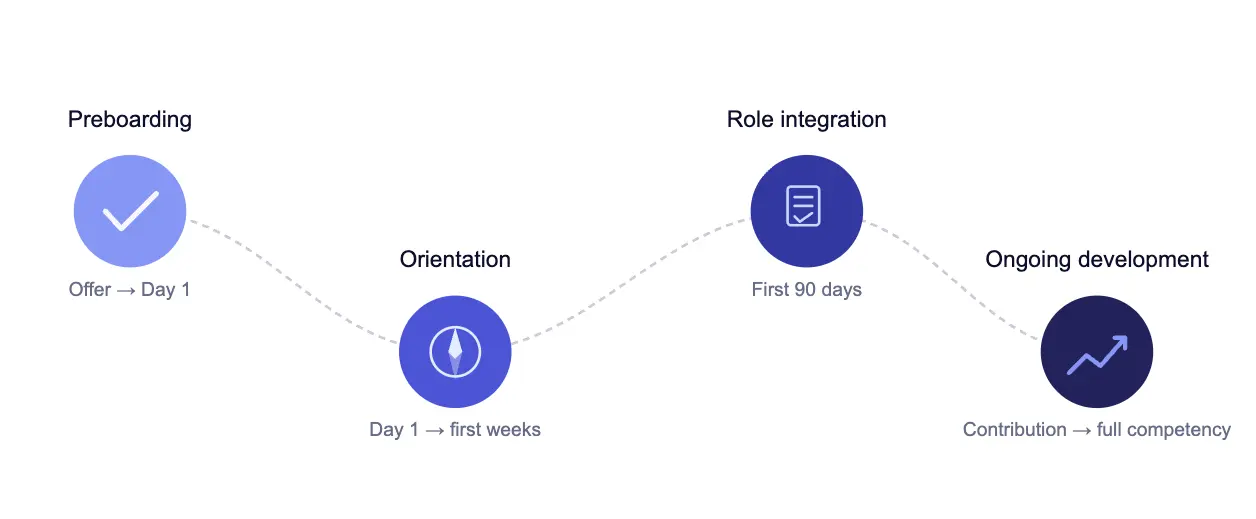
- Journey map: βMap the issues to onboarding stages (Preboarding, Day 1, Week 1, Weeks 2β4, 30/60/90). For each stage, list the top breakdowns and the downstream impact on ramp time.β
- Standardize vs localize: βWhich issues should be standardized globally vs localized by role/region? Provide a recommendation and rationale.β
- Ownership: βFor each theme, assign a primary owner (HR/People Ops, IT, Manager, Buddy, Enablement) and supporting owner. Identify the failing handoff.β
- Prioritization: βPrioritize the top 8 fixes using Impact Γ Effort. Include dependencies and the first 30-day plan.β
- Checkpoints: βConvert the top themes into 6β10 onboarding checkpoints (βreadyβ definitions) with stage, owner, verification method, and enabling asset.β
Data handling note (enterprise):
- Use an enterprise licensed AI offering approved by your security/legal team, with clear controls for privacy, retention, and access.
- Confirm settings so your inputs are not used to train public models (and disable any optional data-sharing features).
- Follow data minimization: remove names, IDs, and sensitive details. Prefer aggregated themes over raw verbatims.
- Store outputs in governed systems and apply your normal access controls.
How do you define shared ownership?
Onboarding breaks when accountability is centralized but execution is distributed. HR sets the system. Managers, IT, and teams deliver it. Thatβs how onboarding stays consistent at scale. Separate onboarding into three layers and assign owners for each:
- Operational setup (readiness)
Primary owners: IT + People Ops
β
Includes: accounts, access, devices, permissions, HRIS setup, payroll/benefits, security and compliance prerequisites. - Shared enablement (baseline for everyone)
Primary owners: People Ops + L&D / Enablement
β
Includes: company context, operating cadence, where knowledge lives, tooling norms, onboarding hub and navigation, and the policies that show up in day-to-day work. - Role readiness (team-specific competency)
Primary owners: Hiring managers (with support)
β
Includes: role outcomes, quality bar, first contribution, workflow practice, feedback loops, and a stakeholder map.
When those layers are defined, itβs easier to distribute responsibilities without losing accountability.
| Workstream |
What it covers |
Primary owner |
Supporting owners |
Key deliverables |
| Operational setup (readiness) |
Day-one ability to work |
IT / Security + People Ops |
HRIS, TA, Hiring manager |
Accounts, device, permissions, HRIS setup, payroll/benefits, compliance prerequisites, escalation path |
| Shared enablement (baseline) |
How the organization works |
People Ops + L&D / Enablement |
Internal Comms, IT, HRBPs |
Company context, operating cadence, βwhere knowledge lives,β tooling norms, onboarding hub, core policies in flow of work |
| Role readiness (team competency) |
Role-specific performance |
Hiring manager |
Enablement/L&D, HRBP, Buddy / learning champion |
Role outcomes, quality bar, first contribution, workflow practice, stakeholder map, feedback loops, 30/60/90 checkpoints |
| Navigation & belonging |
How work really gets done |
Buddy / learning champion |
Hiring manager, HRBP |
Introductions, norms, Q&A guidance, βwho to ask,β surfacing gaps in the hub, reinforcing Week 1 rhythm |
| Program governance |
Consistency over time |
HR / People Ops |
L&D/Enablement, IT, Internal Comms, Business leaders |
Owners per asset, update cadence, versioning/change control, localization rules, measurement dashboard |
Which handoffs matter most?
Most onboarding issues come down to failed handoffs. Make these three handoffs non-negotiable:
- TA β People Ops and IT
Complete start packet and paperwork (start date, location, role tooling needs, exceptions) - People Ops/IT β Manager
βAccess readiness confirmed before day one - Manager β New hire
First-week plan and first contribution defined by end of week one
If you want to operationalize this quickly, create a one-page RACI (Responsible / Accountable / Consulted / Informed) for your onboarding stages and publish it in the onboarding hub.
Onboarding RACI (click to expand)
Keep accountability with people (A/R stays human). Use AI to draft assets, summarize patterns, and monitor whatβs getting stale so owners spend less time reinventing and more time coaching.
Prompts to operationalize the RACI
- Draft a RACI from your process: βHere are our onboarding steps: [paste]. Create a RACI (A/R/C/I) for HR/People Ops, IT/Security, TA, Hiring managers, Buddies, Enablement. Flag unclear ownership and missing handoffs.β
- Identify failing handoffs: βUsing these survey themes + ticket summaries: [paste], list the top 5 failing handoffs, the likely root cause, and the owner best positioned to fix each one.β
- Create owner-specific checklists: βFrom this RACI, generate a checklist for [role] for Preboarding, Day 1, Week 1, and 30/60/90. Keep it to 8β12 items per phase and include links to hub assets.β
- Build a βreadyβ checkpoint set: βConvert this RACI into 8β10 onboarding checkpoints (βreadyβ definitions). For each: stage, owner, how to verify, and the enabling asset.β
- Monitor the hub: βGiven this list of hub pages with last-updated dates and page owners: [paste], flag the top 10 pages at risk of being stale and propose specific updates.β
How do you set a new-hire cadence?
A consistent onboarding cadence is one of the fastest ways to improve the new hire experience without adding more work. It gives Talent Acquisition, HR, IT, and hiring managers a shared rhythm for starts, and it prevents βevery start is a one-offβ chaos and the impact shows up everywhere:
- Slower ramp: people spend early days hunting for context, tools, and answers instead of building momentum.
- Inconsistent expectations: managers improvise, so βwhat good looks likeβ varies across teams.
- Delayed access: ad hoc starts often mean late accounts, permissions, or equipment, which pushes time-to-productivity out.
- Higher early attrition risk: early experiences shape a new hireβs likelihood to stay.
A cadence creates predictability. Predictability creates readiness. And readiness is what turns day one into a path to competency.
Align with stakeholders
βCadence works best when the stakeholders who βtouchβ onboarding agree on why a repeatable rhythm matters and how it helps the organization scale:
- Talent Acquisition: aligns start dates with realistic readiness, protects the candidate-to-employee handoff, and sets expectations before day one.
- Hiring managers: reduces reinvention, makes week one easier to run, and gives managers more time for coaching and feedback.
- IT: enables batch provisioning, fewer urgent one-offs, and higher day-one access success.
- HR/People & L&D: creates a consistent baseline experience you can improve over time.
Framing that helps get stakeholder buy in: A scalable, repeatable cadence reduces friction for the business and improves outcomes for new hires. To build alignment, share a small proof set alongside the decision β either a relevant research datapoint or what you found in your onboarding assessment (for example: early attrition, time-to-access delays, or the most common new hire pain points).
π§ What the research says
What is a βgoodβ cadence? β
You donβt need something complex to start. Define a clear baseline that most hires will follow:
- Preferred start windows (for example, weekly Mondays or twice per month)
- A standard Day 1 baseline (orientation, expectations, and access verification)
- A Week 1 rhythm (manager 1:1, buddy touchpoints, core enablement modules)
- A 30/60/90 checkpoint schedule (lightweight, consistent, measurable)
Handle exceptions
βYou can keep a strong default cadence and still support exceptions for business urgency (a critical role needs someone ASAP) or personal constraints (benefits timing, relocation, immigration requirements, notice periods). The key is to treat exceptions as a defined path.
Keep the default cadence for most hires, create an off-cycle start playbook that preserves the essentials (access ready, expectations set, first contribution defined), and make ownership explicit β who confirms access readiness, who delivers day-one context, and who owns week-one check-ins.
Plan for change management β
Introducing a cadence (or changing the rhythm) is a process change. Expect questions and resistance, especially from teams used to βstart whenever.β Before rollout, align stakeholders on the βwhy,β the default rhythm, and the exception path. Clarify what changes for managers, Talent Acquisition, and IT, and publish a single reference point so people donβt rely on hallway knowledge.
How AI video can help (plus an example you can copy)
When you introduce (or change) a start-date cadence, treat it like change management. A short, manager-facing video creates a single, reference-able source of truth that reduces message drift and cuts down repeat questions.
- Use case: Communicate the new hiring cadence and the βwhy,β with clear exceptions and next steps.
- Audience: Hiring managers, Talent Acquisition, HRBPs, People Ops, IT.
- Where to publish: Onboarding hub + manager toolkit + TA kickoff packet.
- Link: Change management videos
Example video outline: βWeβre moving onboarding to two start dates per monthβ
- Title: New hire start cadence: first and third Mondays
- Length: 2β3 minutes
- Format: Talking head + on-screen bullets + calendar visual
- CTA: Confirm your next start date and complete the preboarding readiness checklist
Scene-by-scene (copy/paste)
- Whatβs changing (0:00β0:20): βStarting next month, weβre standardizing new hire start dates to the first and third Monday of each month.β
- Why weβre doing it (0:20β0:45): βThis gives every new hire a consistent Day 1 experience, improves access readiness, and reduces last-minute scrambling across TA, IT, and managers.β
- What managers need to do (0:45β1:20): βPick the closest start date, confirm access needs by [X days] before Day 1, and schedule the Week 1 manager 1:1 + buddy touchpoints.β
- What TA will do (1:20β1:45): βTA will align offers and start dates to the new cadence by default and flag exception requests early.β
- Exceptions (1:45β2:20): βWeβll support exceptions for urgent business needs, benefits eligibility timing, and immigration requirements. If the start date falls on a holiday, the default shifts to the next business day, unless an approved exception is in place.β
- Where to find the source of truth (2:20β2:35): βThe cadence, key dates, and the off-cycle start path live in the onboarding hub at [link].β
- Close + CTA (2:35β2:55): βIf you have a hire starting in the next 30 days, confirm the start date now and complete the readiness steps by [date].β
Optional add-on (manager enablement): Record a companion video titled βHow to onboard new hires in our processβ that explains the Week 1 rhythm, expectations, and the first contribution checkpoint.
How do you support managers?
Managers are the biggest variable in onboarding. They set expectations, point new hires to the right resources, and determine whether week one creates momentum or confusion. Give managers a clear structure to run the process, then leave room to tailor the details for the role, team, and person. That means:
- turning the role into clear outcomes and priorities,
- defining a first contribution that builds confidence and creates real progress,
- creating a feedback loop early enough to correct course,
- and connecting new hires to the people, tools, and norms that shape how work gets done.
Key onboarding milestones managers should lead
- Before day one: βAre you ready to work?β
Confirm access, tools, and permissions. Share the Week 1 plan so day one starts with context, not admin. - Day one: βWhat does success look like here?β
Set expectations, week-one priorities, and the quality bar. Make it obvious where answers live and how to get unblocked. - End of week one: βWhatβs your first contribution?β
Define a real, scoped, reviewable first piece of work. Agree on how it will be reviewed and what βdoneβ looks like. - End of month one: βCan you run the core workflow?β
Shift from orientation to practice. Walk through the main workflow(s), name common failure points, and establish an unblock path. - Day 30/60/90: βAre you progressing toward role readiness?β
Use consistent checkpoints to review outcomes, identify gaps, and set the next practice goals so ramp stays measurable and consistent across teams.
The manager toolkit
A lightweight toolkit keeps delivery consistent across roles and responsibilities:
- A Week 1 checklist (8β12 items, role-agnostic)
- A first contribution menu by role family (examples + sizing guidance)
- A 30/60/90 checkpoint template (questions + signals + next steps)
- A short manager walkthrough of the onboarding process (cadence, checkpoints, exceptions)
- Clear escalation paths for common blockers (IT, HR, enablement)
If managers have to hunt for guidance, theyβll improvise. Put the toolkit where managers already work and make it the default: embed it in the onboarding hub, send it in the manager start packet as soon as the offer is accepted, and add reminders at the moments that matter β preboarding, day one, end of week one, and day 30.
Manager walkthrough script (click to expand)
Goal: Standardize the onboarding βhowβ for managers without adding more live sessions.
Length: 2β3 minutes
Script (copy/paste)
- Open (10β15 sec): βHereβs how onboarding works in our organization, and what you own as a hiring manager. The goal is a consistent baseline for every new hire, with flexibility for the role and the person.β
- What the program provides (20β30 sec): βPeople Ops and IT handle readiness and the shared baseline: access, core orientation, and the onboarding hub where everything lives. If a new hire asks βwhere do I findβ¦,β the hub is the first stop.β
- What you own (30β40 sec): βYou own role readiness. That means setting week-one priorities, defining the first contribution, scheduling check-ins, and giving early feedback on real work.β
- Your Week 1 plan (40β60 sec): βBefore day one, confirm access is ready. On day one, set expectations and walk through the week-one plan. By the end of week one, the first contribution should be defined, in progress, or completed with review.β
- Checkpoints to hit (30β40 sec): βWe use lightweight checkpoints: βaccess readyβ before day one, βfirst contribution definedβ in week one, and βcore workflow practicedβ by the end of month one. These keep ramp consistent across teams.β
- Exceptions (20β30 sec): βIf a hire starts off-cycle, follow the off-cycle start path in the hub. The essentials stay the same. Only the timing changes.β
- Close + CTA (10β15 sec): βYour next step: open the manager toolkit in the hub, confirm the start date, and schedule the week-one check-ins and buddy touchpoints today.β
How do you leverage onboarding buddies?
Managers set direction. Onboarding buddies make the day-to-day experience navigable. They help new hires learn how work actually happens, where to ask questions, and how to avoid common pitfalls in the first few weeks.
Buddies work best when their scope is defined and repeatable:
- Navigation: help new hires understand where work lives, how to get answers, and who to go to for what.
- Norms and context: share the unwritten rules, including how decisions get made, what good communication looks like, and how reviews and handoffs work.
- Early confidence: make the first two weeks feel manageable by answering common questions, pointing to resources, and reinforcing the Week 1 plan.
- Signal back to the system: surface whatβs missing or hard to find in the onboarding hub. Buddies are your best sensor for gaps.
Buddies are most effective when they understand the broader onboarding process. A short walkthrough helps them learn the cadence, key checkpoints, and who owns what, so their support stays consistent and questions get routed to the right place.
A scalable meeting cadence
Give buddies a cadence they can repeat across hires:
- Day 1: 15β20 minute welcome plus a quick βwhere things liveβ tour
- Week 1: 2β3 short touchpoints focused on unblock and navigation
- Weeks 2β4: weekly check-in to reinforce workflows and answer questions
- Day 30: quick checkpoint: βWhat still feels unclear? What do you wish youβd known earlier?β
Keep the time investment predictable and manageable.
Set buddies up for success
Create a small toolkit so buddies understand their role and can deliver it consistently:
- A buddy checklist (what to cover in Day 1, Week 1, and Month 1)
- A resource map (βstart hereβ links, key tools, key channels, key people)
- A question bank for early check-ins (whatβs confusing, where theyβre blocked)
- An escalation path (what buddies handle vs. what goes to the manager, HR, or IT)
Buddy program toolkit (click to expand)
Use these prompts to select buddies consistently and equip them with a repeatable plan. Then use the script to standardize buddy expectations in a short enablement video.
AI prompts: selecting buddies
- Define selection criteria: βCreate buddy selection criteria for [role family/team]. Include required behaviors, time commitment, and what success looks like after 30 days.β
- Nomination rubric: βTurn these criteria into a 1-page rubric managers can use to nominate buddies. Include 5 scoring dimensions and a minimum score threshold.β
- Capacity check: βGiven this list of potential buddies and their current workload notes: [paste], recommend the best 3 options and explain tradeoffs.β
- Matching logic: βPropose a matching approach for buddies based on role, region, tool stack, and tenure. Provide 3 matching rules and when to break them.β
AI prompts: helping buddies support new hires
- Buddy plan: βDraft a buddy plan for a new hire in [role] on [team], starting on [date]. Include Day 1, Week 1, Weeks 2β4 touchpoints and what to cover in each.β
- βWhere things liveβ map: βTurn this list of tools and channels into a simple guide for a new hire: [paste list]. Include what each is for and who to ask.β
- Week 1 question bank: βCreate 10 practical Week 1 check-in questions a buddy can ask to uncover blockers and missing context.β
- Hub gap spotting: βBased on these new hire questions: [paste], identify what content is missing from the onboarding hub and propose 5 additions.β
- Manager summary: βSummarize these buddy notes into: whatβs going well, whatβs blocked, and what the manager needs to do this week. Notes: [paste].β
Buddy checklist (copy/paste)
- Before Day 1: Introduce yourself; confirm start time and first-day plan; share the onboarding hub link and the βwhere things liveβ basics; confirm access escalation path.
- Day 1 (15β20 min): Welcome + quick tour: where work is tracked, where questions go, key channels, key tools, and who owns what; confirm manager 1:1 is scheduled.
- Week 1 (2β3 touchpoints): Check for blockers (access/tools); reinforce week-one priorities; help the new hire find templates/docs; explain review norms and how to ask for feedback.
- Weeks 2β4 (weekly): Walk through one core workflow end-to-end; share common pitfalls and how to avoid them; make introductions to key partners; surface anything missing or confusing in the hub.
- Day 30 (checkpoint): Ask: βWhatβs still unclear?β and βWhat do you wish youβd known earlier?β Summarize themes and route them to the right owner (manager, People Ops, IT, enablement).
- Ongoing: Flag recurring questions as hub gaps; suggest updates; keep notes short and actionable for the manager.
Video script (copy/paste): βHow to be an onboarding buddy hereβ
- Open (10β15 sec): βThanks for being a buddy. Your job is to make onboarding navigable: help new hires find answers, learn how work flows, and build confidence in the first few weeks.β
- Your scope (20β30 sec): βYou own navigation and norms. You donβt own performance evaluation or setting priorities β that stays with the manager. When something is blocked, you help route it to the right owner.β
- The cadence (30β40 sec): βDay 1: welcome and a quick βwhere things liveβ tour. Week 1: two or three short touchpoints to unblock. Weeks 2β4: a weekly check-in. Day 30: a quick βwhatβs still unclearβ review.β
- What to cover (30β40 sec): βHow we communicate, how reviews happen, where work is tracked, and who owns key decisions. Point them to the hub first, then add context from how the team operates.β
- How to escalate (20β30 sec): βAccess issues go to IT. Role expectations go to the manager. Missing documentation goes back to People Ops/Enablement to improve the hub.β
- Close + CTA (10β15 sec): βYour next step: review the buddy checklist in the hub and schedule your Day 1 and Week 1 touchpoints now.β
How do you add lightweight checkpoints?
When onboarding tasks are distributed across HR, IT, managers, and buddies, checkpoints keep expectations consistent. They turn βwe covered itβ into βwe can verify it,β with definitions that hold across teams and cohorts.
Define each checkpoint the same way:
- Owner: who is accountable
- Verification: what proves itβs done
- Enabling asset/workflow: what makes it repeatable
Sample onboarding checkpoints
-
Day-one access confirmed (before day one)
- Owner: IT / Security
- Verification: Sign-in works and role-critical access is confirmed
- Enabling asset/workflow: Role-based provisioning checklist + ticket/IDM status
-
Week 1 onboarding plan confirmed (by end of day one)
- Owner: Hiring manager (with People Ops support)
- Verification: Week 1 plan is shared and check-ins are scheduled
- Enabling asset/workflow: Week 1 plan template + calendar holds + βwhere to get helpβ map
-
First deliverable defined (by end of week one)
- Owner: Hiring manager
- Verification: First work item has scope, success criteria, and a review plan
- Enabling asset/workflow: First-deliverable menu + βwhat good looks likeβ examples + review rubric
-
Role-critical workflow completed with review (by end of month one)
- Owner: Manager + Enablement
- Verification: New hire completes a key end-to-end workflow and receives feedback
- Enabling asset/workflow: Workflow walkthrough + quality rubric + escalation path
-
30/60/90 progress review completed (on schedule)
- Owner: Hiring manager
- Verification: Progress against role outcomes is reviewed and next goals are set
- Enabling asset/workflow: 30/60/90 template + role outcomes rubric + practice plan
Once checkpoints are in place, measurement becomes straightforward. Attach a pulse question or operational signal to the content behind each checkpoint, then review patterns cohort by cohort.
Align onboarding content to measurement (click to expand)
Use this pattern: Content β expected outcome β signal. Youβre not measuring βcontent completion.β Youβre measuring readiness, clarity, and behavior.
| Onboarding content |
Primary owner |
Expected outcome |
Signal (example) |
When |
| Mission, strategy, and culture |
People Ops / Leadership |
New hires understand priorities and decision context |
βI understand our mission and top priorities for this quarter.β (1β5) |
Day 7 |
| How we work (cadence + norms) |
People Ops / Enablement |
New hires know where work happens and how to collaborate |
βI know where to find information and where to ask questions.β (1β5) |
Day 7 |
| Tools and systems basics |
IT / Enablement |
New hires can access and use core tools without blockers |
Time-to-access (days) + βI have access to the tools I need.β (1β5) |
Day 7 |
| Role expectations + success criteria |
Hiring manager |
New hires understand priorities, quality bar, and evaluation |
βI know what Iβm responsible for this week.β (1β5) + βFirst contribution defined.β (Y/N) |
Day 7 / End of Week 1 |
| Core workflow walkthrough + practice |
Enablement + Manager |
New hires can complete the core workflow with support, then independently |
βCore workflow practiced.β (Y/N) + βI can complete the core workflow with support.β (1β5) |
End of Month 1 / Day 30 |
| Policies that show up in daily work (security, compliance, HR essentials) |
People Ops / Security |
New hires know what to do and where to go when policy questions come up |
βI know what to do if Iβm unsure about a policy requirement.β (1β5) + top policy question themes |
Day 30 |
Optional open-text prompts (add one per pulse):
- βWhat was the biggest obstacle to your productivity this week?β
- βWhat information was hardest to find?β
- βWhat would have made Week 1 easier?β
How AI can help (when your survey tool wonβt)
If your survey platform doesnβt summarize themes or compare cohorts, AI can help you synthesize open-text responses and spot patterns across roles, regions, and managers.
For example, export comments to a CSV, then ask an AI tool to: group responses into themes, quantify which themes are most common, map themes to onboarding stages,
and propose the top fixes with owners and checkpoints.
- Theme extraction: βGroup these responses into 5β7 themes, estimate frequency, and provide 2β3 representative quotes per theme.β
- Cohort comparison: βCompare themes across [role/region/manager] and identify whatβs shared vs unique.β
- Action mapping: βMap each theme to a likely fix type: guideline update, checkpoint, asset, or process change. Assign an owner.β
Next steps
- Assess whatβs happening now. Use the worksheet and synthesis prompts to pinpoint the top friction points across cohorts, roles, and teams.
- Make ownership and handoffs explicit. Publish the ownership model and the three non-negotiable handoffs in your onboarding hub.
- Add checkpoints and measurement. Define 3β5 onboarding checkpoints, then pair each with a simple Day 7 / Day 30 / Day 90 pulse tied to the outcomes behind it.
- Run a monthly improvement cycle. Review signals, assign an owner to each fix, and update the onboarding hub as the single source of truth
π If youβre looking for more onboarding resources, check out our posts on creating onboarding checklists, onboarding videos, onboarding scripts, and new hire training plans.
π From experience
Q: How long does it take to create a good onboarding experience?
A: Long enough to build something repeatableβand then long enough to keep improving it.
The goal isnβt perfection on day one. Itβs a baseline you can run consistently, measure, and iterate.
Iβve seen both ends of the spectrum. At one startup, my onboarding was a 30-minute virtual session focused on benefits and perks.
I was hired to build the L&D function, so onboarding didnβt really exist yet.
Iβve also worked at companies with week-long, in-person onboarding programs: structured sessions, clear milestones,
and time built in to meet the people and systems you rely on.
When I helped build a repeatable onboarding program from scratch, it took about six months to implementβand years to refine.
With distributed offices and remote or hybrid work, it required steady iteration to keep the experience consistent.
Checkpoints and measurement made that iteration possible.