AI in Instructional Design: How IDs Are Using AI in 2026

Create engaging training videos in 140+ languages.
Every day, I'm inundated with hot takes about things AI is ruining. That list includes everything from the publishing industry and jigsaw puzzles to the job market. And yes, even learning.
If you're here because you're worried AI is going to make your job obsolete, I get it. But instructional design is a role that requires judgment. You bridge disciplines like learning science and psychology to decide what people need to learn, how to know if it worked, and what to change when it didn't.
AI doesn't know your organization or what good looks like. You do.
What AI can do is give you more time to focus on the parts that matter most, like measuring business impact. Here's how.
What's changed for instructional designers
I used to lead a training where I'd ask participants to share a task they dreaded. For IDs, that list usually includes things like generating captions for a video training or analyzing thousands of survey responses for emerging patterns.
Thanks to AI, those tasks have gotten faster or even automated. That capacity adds up, and the best use of it is strategic work.
Where AI adoption is strongest today
87% of learning and development practitioners reported using AI in our 2026 AI in L&D Report.* Most of that usage concentrates on content creation: tasks like quiz and content drafting, video creation, and translation.
Even though adoption is broad, it is uneven in maturity and distribution across instructional design workflows. The chart below shows where adoption is strongest across the ADDIE model.
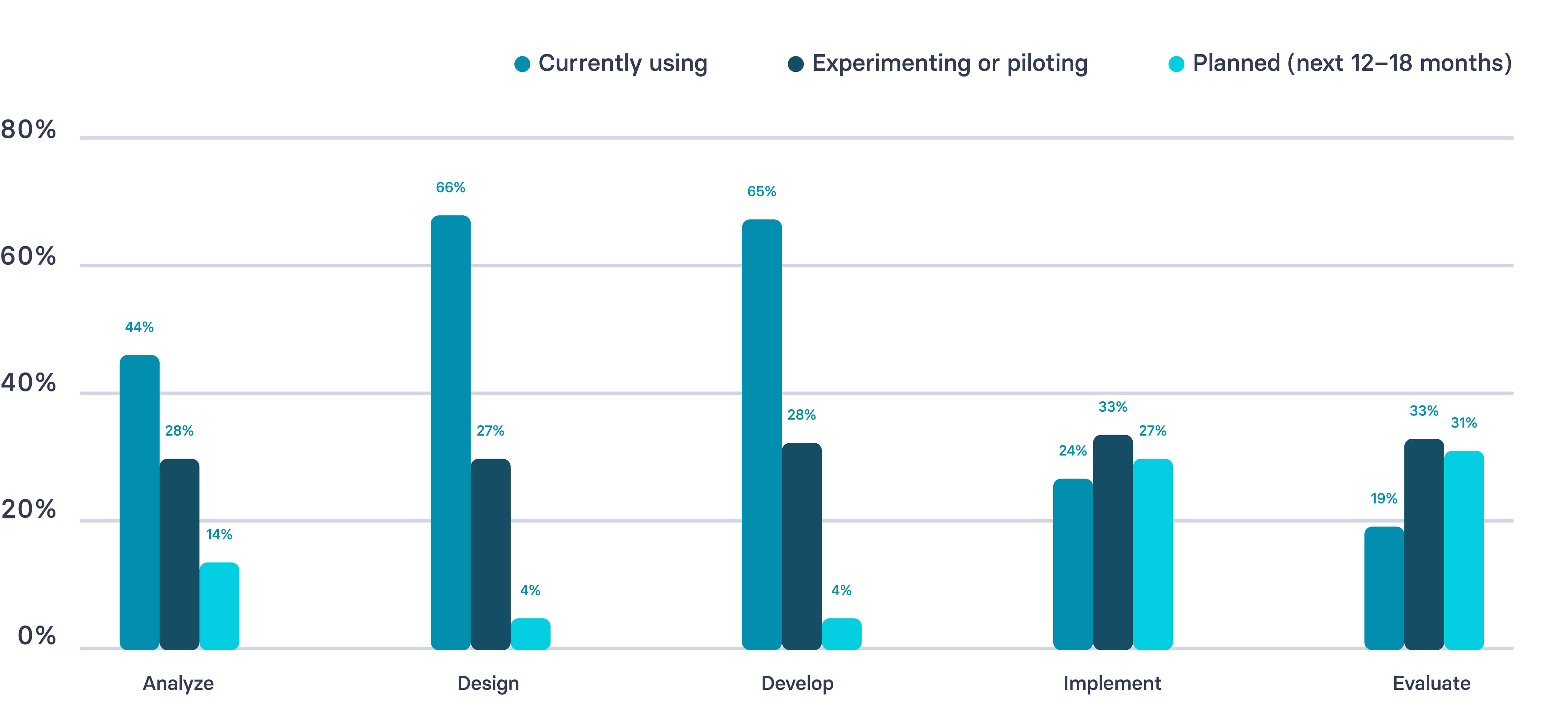
An important caveat about our data. Many of the respondents are customers or practitioners in our networks. As an AI company, this likely skews the levels of AI engagement reported. Of 421 respondents, 38% were instructional designers.
6 ways instructional designers are using AI
If you're looking for inspiration on how to bring AI into your L&D workflows, here's what I recommend. Start with tasks where there's a clear input and output and the risk of failure is low. Something like generating wrong answers for an assessment. If it messes up, you can easily correct it. No big deal.
As you get more comfortable with AI, move toward tasks where there's more ambiguity, like design.
1. Transcribe and synthesize stakeholder interviews
Record your calls with videoconferencing software so you can easily upload transcripts and ask AI to pull out recurring themes or potential gaps.
If you're comparing multiple data sources and have the raw data or an anonymized version, you can upload these for a more contextualized view. What took hours of manual review becomes a structured summary in minutes.
2. Surface performance gaps
If you have performance data from annual reviews or probation reviews, ask AI to find patterns of performance issues.
For example, if an entire team is not meeting expectations, that might warrant a review of the manager's performance. AI won't diagnose root causes, but it will show you where to look.
3. Draft learning objectives
There comes a point where you've exhausted Bloom's taxonomy of verbs and are feeling uninspired. Bounce ideas around in a chat to cut through writer's block.
When you're ready to start designing the learning experience, consider AI a thought partner. Something to bounce ideas off of, especially if you're the only ID on a project or working in a distributed team.
4. Generate discussion prompts and learning activities
If you're designing a live session, you may want more thought-provoking questions or if the same session runs multiple times, a variety of those prompts. AI is strong at proposing a variety of learning modalities, exercises, and reference materials.
They might not all be feasible, but sometimes these ideas spark creativity. It's easier to react to something than to start with a blank slate.
5. Build assessments and rubrics
Whether you need knowledge checks sprinkled throughout a course or a rigorous certification assessment, have AI help propose questions and distractor answers.
Take existing high-quality rubrics and use them as illustrative examples of your desired output. Partner with AI to fill out concrete examples aligned with learning outcomes in a fraction of the time.
6. Produce content assets
The development stage is where most IDs start with AI. This is where the volume of work is highest and probably where you can use the most support. You know what you need to produce. AI just makes it faster.
That might be outlines, scripts, job aids, facilitator guides, or even a first pass at graphics and slide decks. Start with whatever source material you have and ask AI to draft away. That way you can focus on editing.
Benefits and challenges of using AI in instructional design
If you try any of the use cases above, you'll likely find they save you time, and probably money too. When you factor in how much your time costs the business, and what you might otherwise outsource, the math adds up quickly.
But there are important nuances to these benefits. If you're looking to make the case for using AI in your ID workflows, here's some important considerations.
Content production
Benefits: AI helps IDs create content more quickly. 88% of respondents to our 2026 AI in L&D Report reported saving time on content creation.
Challenges: But creating content faster doesn't mean it's working. I've described this pattern as readiness debt. We're producing more, but not following through to understand whether that content is leading to better outcomes.
Cost
Benefits: Using AI is correlated with cost savings for IDs. If you're able to outsource less work, say to a graphic designer or video production company, you're potentially saving thousands of dollars. 45% of teams are already reporting financial benefits, though many expect clearer gains as AI becomes more embedded in their workflows.
Challenges: While AI can reduce operational overhead, AI tools aren't free. Enterprise licensing, usage caps, and the cost of more powerful models for complex tasks all add up. Custom AI solutions built into your L&D tech stack, like LMS platforms with AI features, carry their own costs too. As adoption deepens across your team, the bill will grow.
Feedback loops
Benefits: AI makes it easier to collect and act on evaluation data, shortening the loop between delivering content and understanding whether it's working. For a full framework on how to do this, see the measurement section below.
Challenges: The gap between content creation and evaluation is growing. Only 19% of L&D teams are using AI for evaluation, compared to 65% using it for content development. We're creating faster but not following through.
Skills and capacity
Benefits: AI can exponentially increase the impact of your skill set. You can learn new tools faster, build your own automated workflows, and take on work that previously required specialists. A few years ago, creating a video training meant learning video production or outsourcing it. Now you can create one without either. And while AI isn't quite able to clone you yet, it's getting closer.
Challenges: But there's a real risk of workload creep. Research from UC Berkeley Haas found that AI didn't reduce work, it intensified it. Workers took on broader scope, worked faster, and extended work into more hours of the day, often without being asked. Over time, this led to cognitive fatigue, burnout, and weakened decision-making. A separate survey found workers using AI save nearly an hour a day on average, but the reward for working faster is often just more work.
Business impact
Benefits: 41% of L&D teams say AI is already contributing to business impact through faster delivery and higher output.
Challenges: Most teams haven't reached the maturity to demonstrate measurable business impact from AI in ID. Only 9% have reached the stage of scaling AI across their organization, and just 6% describe AI as fully integrated. Over the next few years, I expect this will continue to grow as organizations develop their AI literacy and connect learning even deeper to business metrics.
These benefits and challenges can vary greatly depending on your tech stack, both in L&D and across your organization.
AI tools for instructional designers
When considering which AI tools to use, whether for the examples above or another task, I recommend starting with an assessment of your existing tech stack. If you already have an LLM like ChatGPT, it will be much easier to leverage that tool since it is likely already connected to important data sources and vetted for compliance and security. (This guide can help you sort the model differences.)
Similarly, it may be easier to invest in the AI capabilities of an existing tool, like your LMS, than to take on the change management exercise of replacing it.
If, however, you are looking to source a new tool, see our guide on AI in L&D.
Example use case: training videos
Say you're looking to update or build a video content library. You have existing materials, perhaps a script, slides, or even a webinar transcript. With an AI video tool like Synthesia, you can transform that source material into a first draft in minutes. From there, you iterate on design, publish quickly, and localize it across languages.
You don't need a production crew or a studio. Just structured prompts and a firm grasp of learning design best practices.
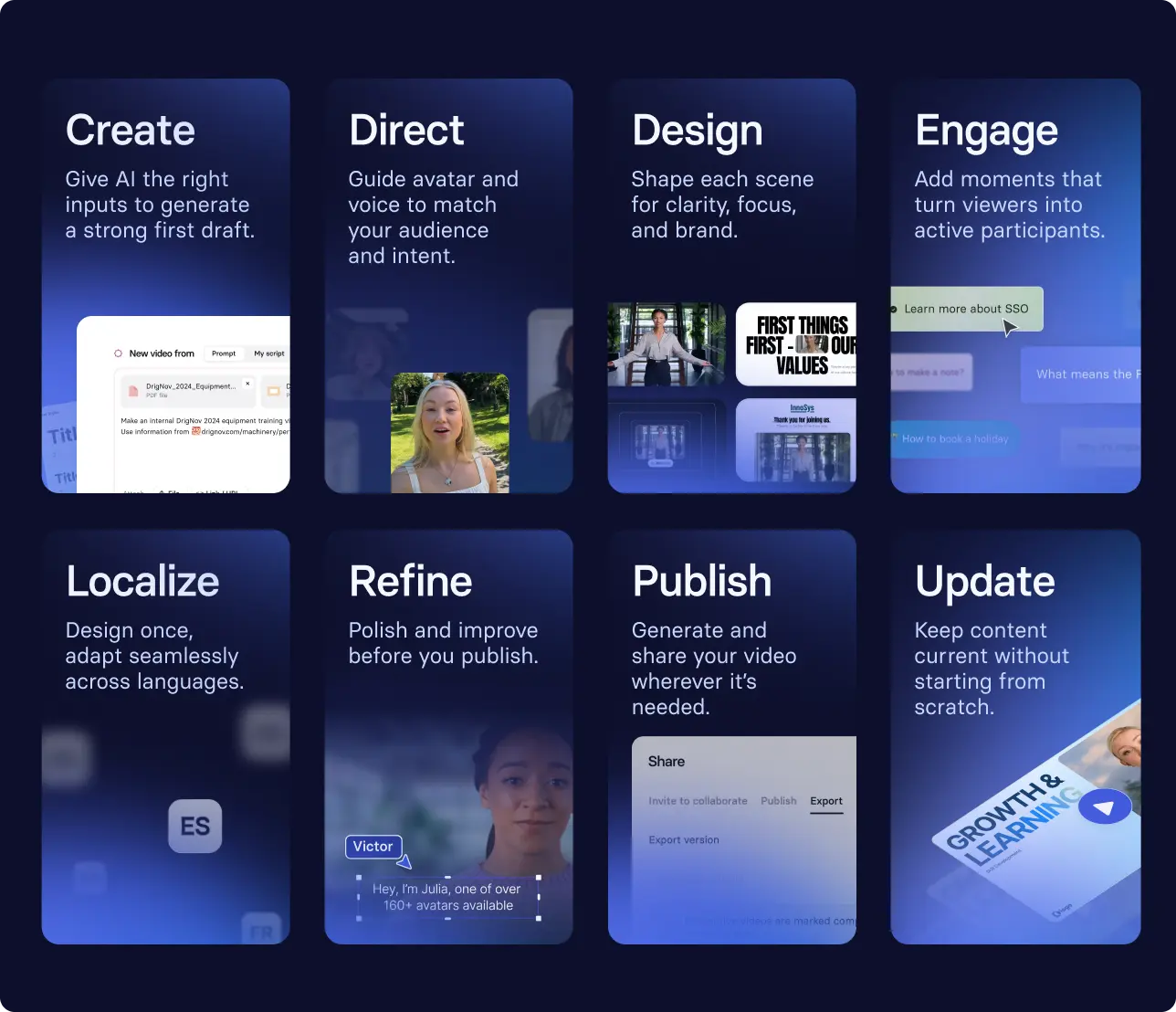
Sky Italia used this approach to launch over 100 learning paths and accelerate new product launches by 4x.
How to use AI to measure whether learning is working
If you try out any of these use cases, one of the benefits should be getting some time back in your day. I'd recommend using that freed up capacity to focus on measurement.
Transfer research has long shown that outcomes depend on what happens after training in the work environment. Yet most L&D teams still struggle to collect that evidence consistently.
And unfortunately, AI is both part of the problem and part of the solution.
Look at our survey data: 65% of L&D teams are using AI to develop content, but only 19% of those same teams are using it to evaluate. We're creating content more quickly, but not gaining the same traction in measurement.
That needs to change, and it starts by building evaluation more sustainably into your workflows.
AI can help you compile formative and summative evaluation data and summarize patterns, just as it would in a needs analysis.
It can also help you automate your workflow so you actually collect that data consistently, whether that's a Zapier workflow pulling LMS data into a weekly summary, your LMS sending automated reminders and compiling completion data, or an AI tool synthesizing open-ended feedback into themes you can act on.
This work comes down to a few decisions:
- What behavior needs to change?
- What signal will show if it’s changing?
- What counts as progress?
- What will you change based on what you see?
Where you need a human in the loop
While AI accelerates production and supports intelligence, L&D teams continue to own learning science, contextual judgement, ethical standards, quality assurance and brand voice — keeping humans firmly in control of relevance and rigor. — Dr. Philippa Hardman
The term "human-in-the-loop" comes from machine learning, a subset of AI. It's basically when the user is able to change the outcome of a process. In L&D, having a human in the loop of AI workflows is essential.
Your judgment should be prioritized across the instructional design process. You are responsible for either doing these tasks, or delegating and documenting them:
- Setting and upholding standards
You control what "good" looks like, and ensure the quality and inclusivity of learning experiences. That means making sure AI is following accessibility standards like WCAG, or that content is culturally appropriate for your audience. - Grounding your tools in organizational data
That might be company style guides or templates, or policies for compliance. You're making sure the AI isn't hallucinating. - Choosing what to measure
AI can generate suggestions, but you need to verify they are the right signals for your organization. - Documenting your decisions
Governance ensures that your outputs are trustworthy at scale. If it isn't written down, quality becomes a function of whoever was paying attention that day.
AI governance is consistently cited as an organizational gap in both peer-reviewed (see above) and our practitioner insights.
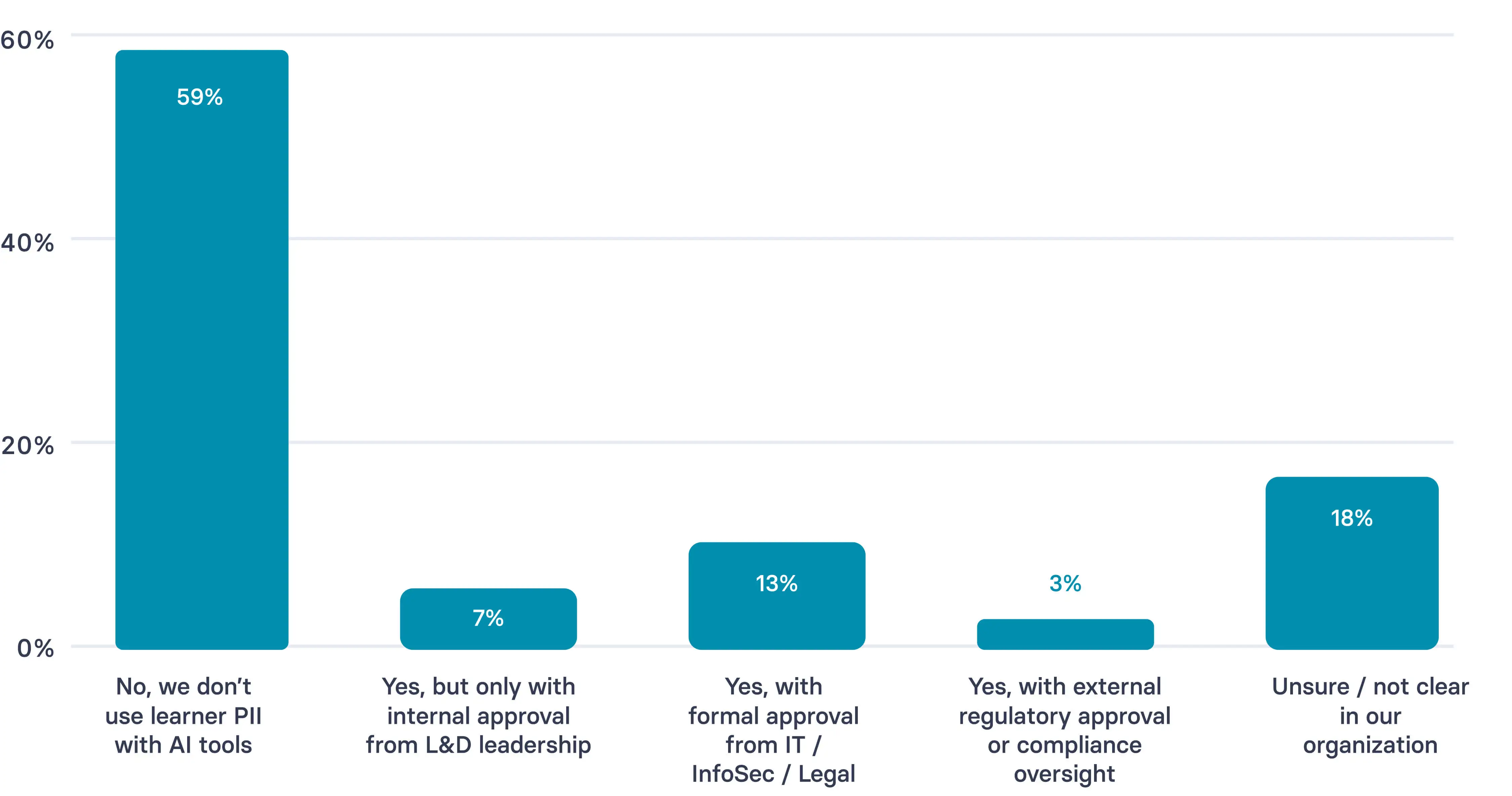
If the future of workplace development is personalized learning at scale, then it is inevitable for these issues to continue to be obstacles. Personalized learning will require AI integration with personally identifiable information (PII) sources. And as you can see from our survey, 59% of practitioners are still not using PII, with 18% noting the approval process to do so is unclear.
One of the best ways to demonstrate your value as an ID is to partner with your organization to create and document these best practices.
That's not something AI can do for you. It's what makes your work trustworthy, even as it scales with AI.
What the future of instructional design looks like
The role of instructional design is evolving. More of the production work will happen through AI. The responsibility for design and evaluation will stay with instructional designers.
I like to think of the role transforming into something closer to a conductor. Benjamin Zander, the conductor and educator behind The Art of Possibility, describes the role this way:
The conductor of an orchestra doesn't make a sound. He depends for his power on his ability to make others powerful.
I've always seen my role in L&D as being defined by my ability to empower other people, whether in their roles or in their careers. My performance is defined by my ability to enable others. Much like a conductor, my success isn't measured by what I produce. It's measured by what the people I design for are able to do differently.
A conductor's role is to shape the sound. That means managing dynamics like tempo and section volume, listening to what's happening in the room, and redirecting when something isn't working. They don't play the instruments. They interpret and lead.
For IDs, that's what evaluation enables. When you have the right signals (learner behavior data, workflow metrics, feedback patterns), you can see what's working and what isn't.
AI gives you the capacity to collect and interpret those signals faster. Knowing what to do with them, when to adjust, and what good looks like, that's your judgment.
IDs will define outcomes, set objectives, and decide what should change. Content, video, and assessment will still need to work together. Someone will need to notice when they don't and fix it.
AI makes it easier to produce and update learning. That's not the hard part anymore. Instructional designers will continue to decide what should change, what to measure, and what to do with what you find.
That's the work.
Ready to spend less time on production and more time on what matters? Book time with our team.
Amy Vidor, PhD, is the Learning and Development Evangelist at Synthesia, where she researches learning trends and helps organizations apply AI at scale. With 15 years of experience, she has advised companies, governments, and universities on skills.