AI in Learning & Development: 9 Tools L&D Teams Actually Use

Written by
Kevin Alster
January 7, 2026

Create AI videos with 230+ avatars in 140+ languages.

Try Free AI Video
Get Started for FREE
Get started

🧠 AI tools for training & learning design

Over the past seven years working in L&D, I’ve watched learning technology trends come and go.

New tools arrive with big promises, generate interest, and often fall short once they meet real constraints like limited time, SME availability, LMS limitations, and the need for learning that actually holds up in practice.

AI feels different, not because it replaces instructional design, but because it changes how the work gets done when it’s used thoughtfully.

Our recent AI in Learning and Development 2026 report suggests that many L&D teams are still in a cautious, exploratory phase.

That hesitation makes sense. Most L&D teams aren’t resisting AI, they’re trying to understand it well enough to apply it responsibly.

As AI adoption accelerates, learning teams are being asked to move faster, but also to be more strategic than ever.

The tools below represent different ways AI is already showing up in instructional workflows today.

πŸ” How I evaluated these tools

  • I tested every tool using the same learning scenario: giving and receiving constructive workplace feedback.
  • I chose this topic because soft skills quickly expose limitations in tone, nuance, and contextual judgment.
  • I looked at how each platform handled content drafting, learning flow, video or voice, practice, and iteration.
  • I focused on realistic, day-to-day L&D work rather than edge-case or demo scenarios.
  • I reviewed each tool from the perspective of an L&D Manager or Instructional Designer.
  • Where possible, I worked from existing source materials instead of starting from blank prompts.
  • This made it easier to see where each tool fits in an L&D workflow and where human judgment is still required.

1. Synthesia

What is Synthesia?

Synthesia is an AI video creation platform that allows instructional designers and learning teams to turn written content into professional training videos without traditional video production workflows.

Instead of working with cameras, timelines, and editing software, you build videos by editing scripts and scenes, selecting AI presenters, and generating voiceovers automatically.

The platform is designed to make video creation accessible to people who understand learning content but do not specialize in video production.

{lite-youtube videoid="qekrkHtgFv0" style="background-image: url('https://img.youtube.com/vi/qekrkHtgFv0/maxresdefault.jpg');" }

How Synthesia fits into an L&D workflow

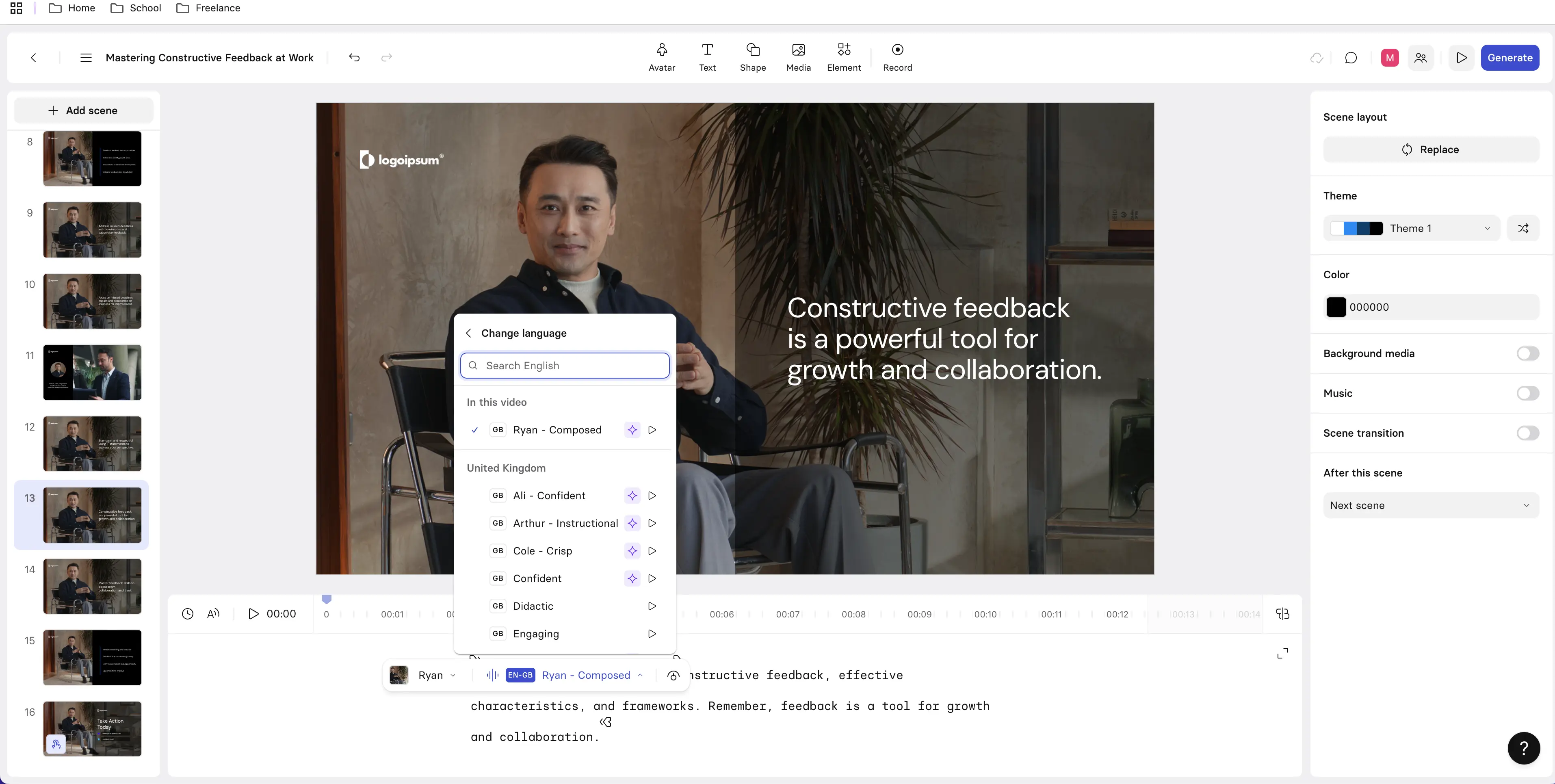
I tested Synthesia by creating a short training-style explainer on giving and receiving constructive workplace feedback.

Rather than starting from a blank prompt, I uploaded a structured course brief so I could evaluate how accurately the platform translated existing instructional content into video. Synthesia generated an initial script, scene layout, and presenter-based video automatically.

From upload to a usable draft took roughly 20 to 30 minutes, including light script review and scene adjustments. The output felt clean and accurate with minimal rework required before it was ready for internal review.

What stood out most in practice was how approachable the workflow felt. Working with scripts and scenes made the process intuitive, and I never felt like I was fighting the tool to achieve a professional result.

It was clear that this is a platform designed for instructional designers and subject matter experts, rather than just for video specialists.

Where Synthesia fits from an instructional design perspective

From an instructional design perspective, Synthesia fits most naturally within the development and implementation stages of a learning project. It works best when learning objectives, structure, and messaging are already defined and need to be translated into a consistent video format.

Synthesia balances production speed with learning quality well. Compared to traditional video workflows, development time is dramatically reduced, yet the resulting videos do not feel rushed or unfinished.

Because the content is driven by your source material, instructional intent remains intact rather than being replaced by generic AI output.

The level of control is moderate but intentional. Script edits, scene sequencing, voice selection, and visual style changes are easy to manage without overwhelming the user. While it does not offer the fine-grained flexibility of a full video editor, that trade-off supports speed, consistency, and ease of use.

From an enterprise and LMS perspective, Synthesia fits cleanly into real-world learning ecosystems. Videos embed easily into most LMS platforms and can be reused across onboarding, compliance, and internal communications.

🎯 Where Synthesia works best

  • Scalable onboarding and orientation videos.
  • Training content that needs frequent updates or localization.
  • SME-driven video creation without heavy production support.
  • Programs where consistency and clarity matter more than deep interactivity.
  • Highly interactive learning with branching paths or assessments.

⚠️ Where Synthesia falls short

  • Complex scenario simulations.
  • Custom visual storytelling that requires detailed animation or bespoke graphics.

‍Pricing

At the time of writing, Synthesia plans start at approximately $18 USD per month for individual use. Team and enterprise plans are available for organizations that need additional features, users, or governance controls. Pricing varies by plan and region, and a free tier is available.

Final thoughts from hands-on use

From a practitioner perspective, Synthesia stands out because it removes friction from one of the most time-consuming parts of instructional development without compromising learning quality. It does not replace instructional design work, but it allows designers to spend far less time on production mechanics and far more time on clarity, alignment, and learner experience.

For teams that need to produce professional training videos quickly and consistently, Synthesia offers practical value when paired with strong instructional design practices.

2. Colossyan

What is Colossyan?

Colossyan is an AI video creation platform that converts written content into narrated videos using AI avatars. Its core functionality centers on turning documents or scripts into short, presentation-style videos without requiring traditional video editing skills.

The platform is built for speed and simplicity, making it easy to move from written content to video with minimal setup.

How Colossyan fits into an L&D workflow

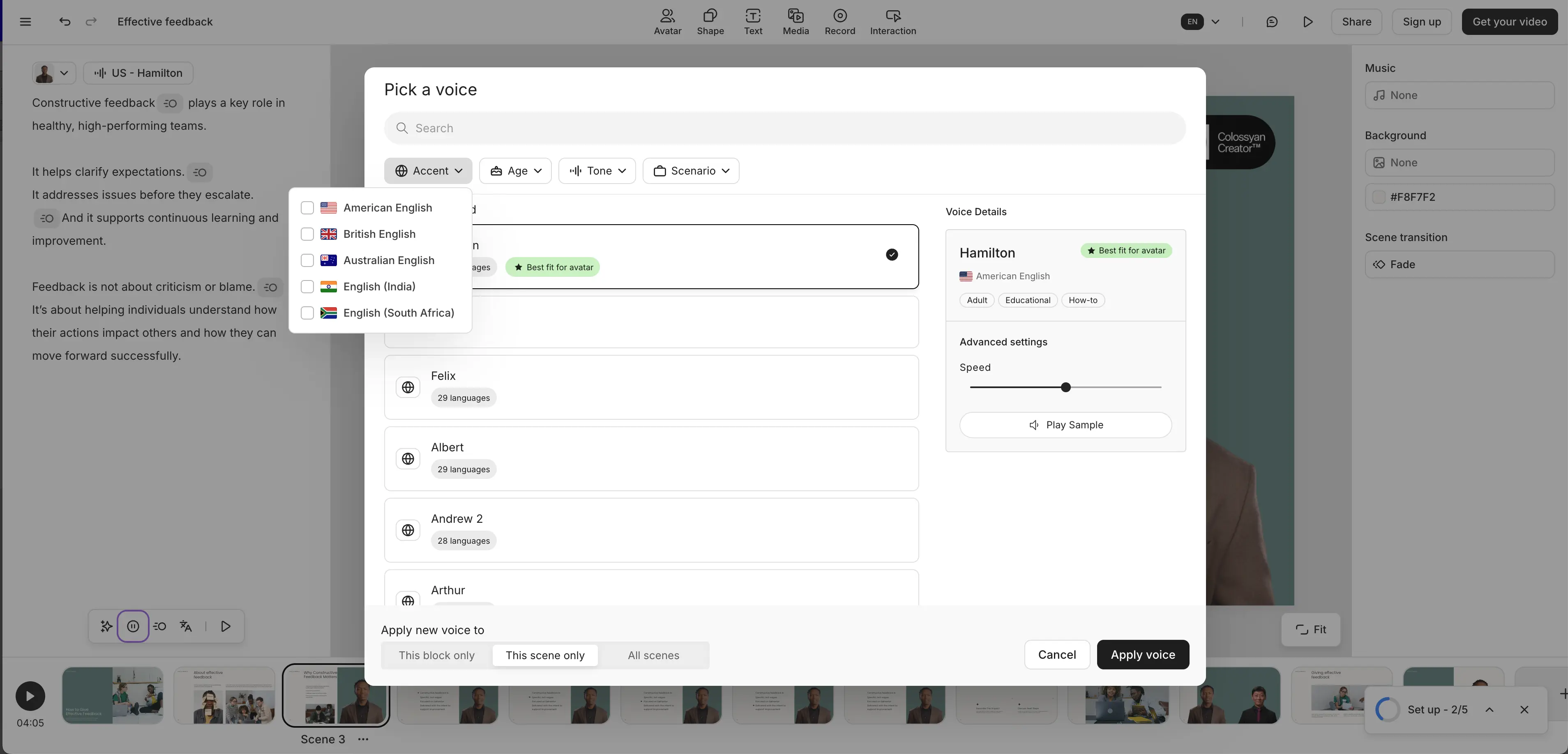
I tested Colossyan by creating a short explainer video on giving and receiving constructive workplace feedback, using its document-to-video feature rather than building content manually from scratch. I uploaded a prepared source document and allowed the platform to automatically generate scenes, narration, and avatar delivery.

I also tested the instant avatar option to assess how quickly a usable video could be produced with minimal configuration.

From upload to a usable draft, the process took approximately 15 to 25 minutes. Most of that time was spent reviewing the generated scenes and making small adjustments to improve clarity.

The workflow was straightforward and required very little setup, which made it easy to move quickly from concept to draft.

In practice, Colossyan felt well suited for creating early video drafts or internal-facing content. The output was usable, but it often benefited from additional instructional refinement before it felt ready for broader learner audiences.

Where Colossyan fits from an instructional design perspective

From an instructional design perspective, Colossyan fits primarily within the development stage of a learning project and functions best as a rapid conversion tool rather than a design tool. It performs well when the instructional structure already exists in the source document and needs to be translated into video quickly.

Colossyan prioritizes production speed over instructional nuance. While this makes it effective for fast turnaround, it also means that pacing, emphasis, and engagement depend heavily on how well the original content is written.

For topics that require subtle tone or learner engagement, additional refinement is often necessary to avoid content feeling flat or overly text-driven.

The level of control is relatively limited. Script edits are easy to make, but options for adjusting vocal delivery, visual emphasis, or presentation style are constrained compared to more mature AI video platforms. This simplicity lowers the barrier to entry but can feel restrictive for experienced instructional designers.

From an enterprise and LMS perspective, Colossyan videos embed cleanly into most LMS platforms. However, the platform itself focuses on video output only, so assessments, interactivity, governance, and reuse typically need to be handled through other tools.

🎯 Where Colossyan works best

  • Rapid conversion of existing documents into basic training videos.
  • Internal explainer or announcement-style content.
  • Early drafts or prototypes of video-based learning.
  • Teams with limited video production experience that need quick results.

⚠️ Where Colossyan falls short

  • Highly polished or learner-facing training programs.
  • Global training initiatives that require extensive language or accent support.
  • Learning experiences that rely on pacing, emphasis, or engagement to drive behavior change.

Pricing

At the time of writing, Colossyan offers paid plans starting at approximately $27 USD per month, with higher-tier plans available for teams and organizations that require additional features. Pricing varies based on usage and plan level.

Final thoughts from hands-on use

From an experienced instructional designer’s perspective, Colossyan is a practical entry-level AI video tool for quickly turning written content into video.

It performs best when expectations are clear. It accelerates production, but it does not replace instructional design judgment or provide deep customization.

For teams that prioritize speed and simplicity, Colossyan can be a useful option. For organizations that require higher levels of polish, consistency, or scalability in video-based learning, it is more likely to serve as a supporting or transitional tool rather than a long-term core platform.

3. Mindsmith AI

What is Mindsmith?

Mindsmith AI is an AI-powered instructional design and course authoring platform that helps users generate structured learning content such as objectives, modules, and activities from a clear set of instructions or source material.

Rather than focusing on media production, Mindsmith is built to support the early stages of course creation by turning instructional intent into an organized learning structure.

How Mindsmith fits into an L&D workflow

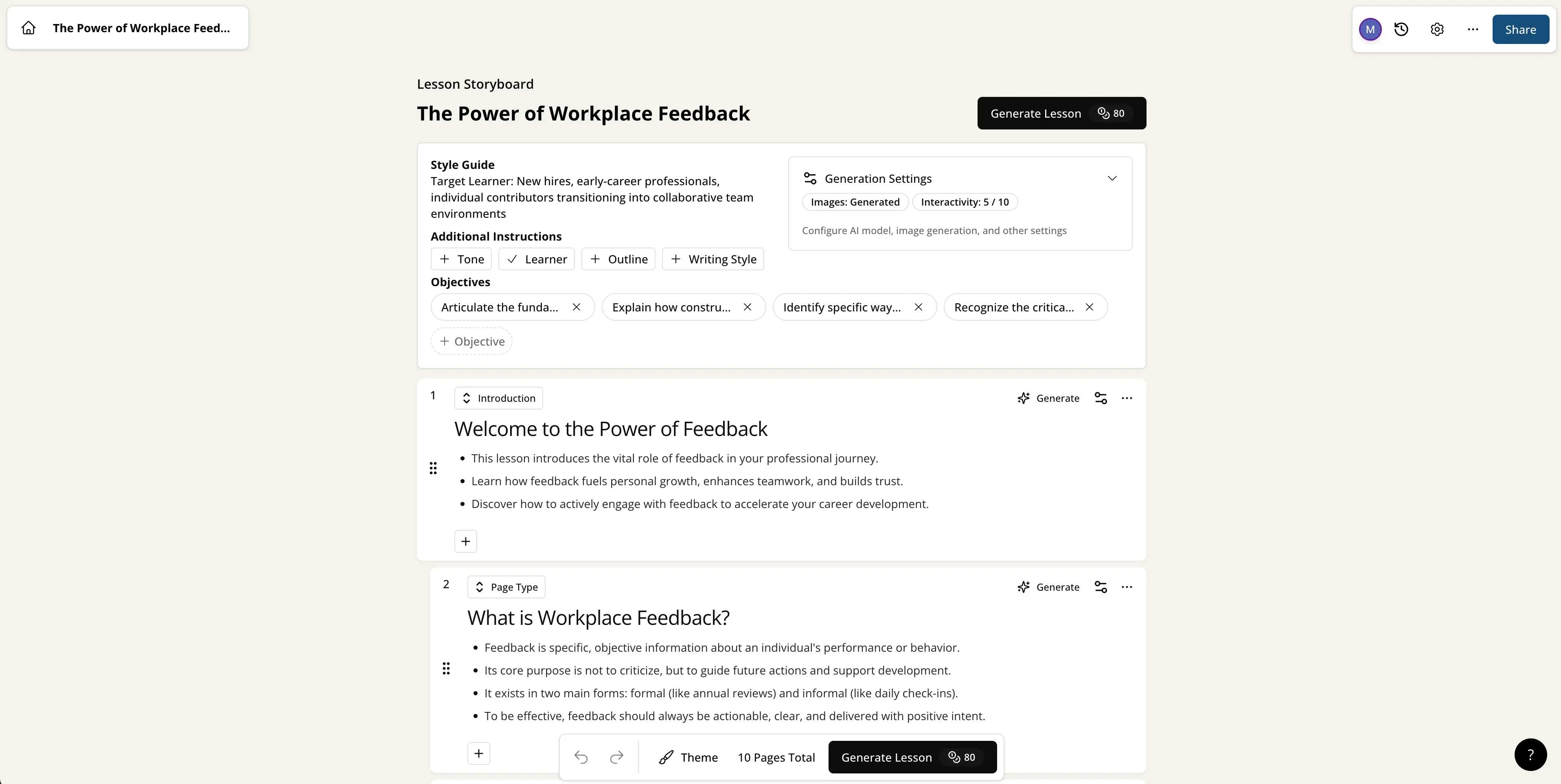
I tested Mindsmith AI by building a short course on giving and receiving constructive workplace feedback using its AI-assisted course generation feature. I provided a clear course brief that outlined the target audience, learning objectives, and intended module structure, then allowed the platform to generate an initial course draft.

From initial prompt to a usable outline and content draft, the process took approximately 20 to 30 minutes, including light edits to refine wording and sequencing. My focus during testing was on how well the platform translated instructional intent into a coherent learning flow rather than on visual design or media output.

In practice, Mindsmith felt like a strong accelerator for moving past the blank-page stage. The generated structure provided momentum without locking me into rigid templates or generic phrasing.

Where Mindsmith fits from an instructional design perspective

From an instructional design perspective, Mindsmith aligns most strongly with the analysis and design stages of a learning project, with added value in early development. It supports intentional structure, clearly aligned objectives, and modular course design that experienced IDs can refine and expand.

Mindsmith balances speed with instructional quality well. Instead of producing large volumes of content quickly, it helps designers arrive at a well-organized first draft that feels intentionally designed rather than auto-generated. Instructional refinement is still required, particularly to adjust tone, add context-specific examples, and strengthen application and engagement.

The level of instructional control is high. Objectives, modules, and content are fully editable, and changes do not disrupt the overall structure. Because the platform is content-first rather than media-first, it gives designers room to apply judgment and nuance without fighting rigid layouts or presentation constraints.

From an enterprise and LMS perspective, Mindsmith works best as an upstream design tool. Generated content can be exported and adapted for use in SCORM-based authoring tools or other delivery platforms, supporting reuse and consistency across multiple courses.

🎯 Where Mindsmith works best

  • Rapid course outlining and early design acceleration.
  • Standardizing instructional structure across multiple topics or programs.
  • Helping instructional designers move efficiently from analysis into design.
  • Teams that want structure and alignment before investing in media or development.

⚠️ Where Mindsmith falls short

  • Media-rich course delivery on its own.
  • Video production or narration.
  • Highly interactive learning experiences or simulations.

Pricing

At the time of writing, Mindsmith AI plans start at approximately $39 USD per month, with a free tier available. Pricing varies based on features and usage, particularly for individuals and teams scaling course development across multiple users or projects.

Final thoughts from hands-on use

From an experienced instructional designer’s perspective, Mindsmith AI is most valuable as a thinking partner rather than a replacement for design expertise. It accelerates the early stages of course creation by providing structure, alignment, and momentum, allowing designers to spend more time refining learning experiences instead of building frameworks from scratch.

When used alongside delivery tools such as AI video platforms or traditional authoring tools, Mindsmith fits naturally into a modern L&D workflow and supports both efficiency and instructional quality.

4. Coursebox AI

What is it?

Coursebox AI is an AI-powered course creation platform designed to generate complete online courses from a prompt or uploaded content. It can automatically create lesson structure, instructional content, and basic quizzes with minimal manual setup.

The platform is built to prioritize speed and coverage, allowing users to move quickly from an idea to a delivery-ready course draft.

How Coursebox fits into an L&D workflow

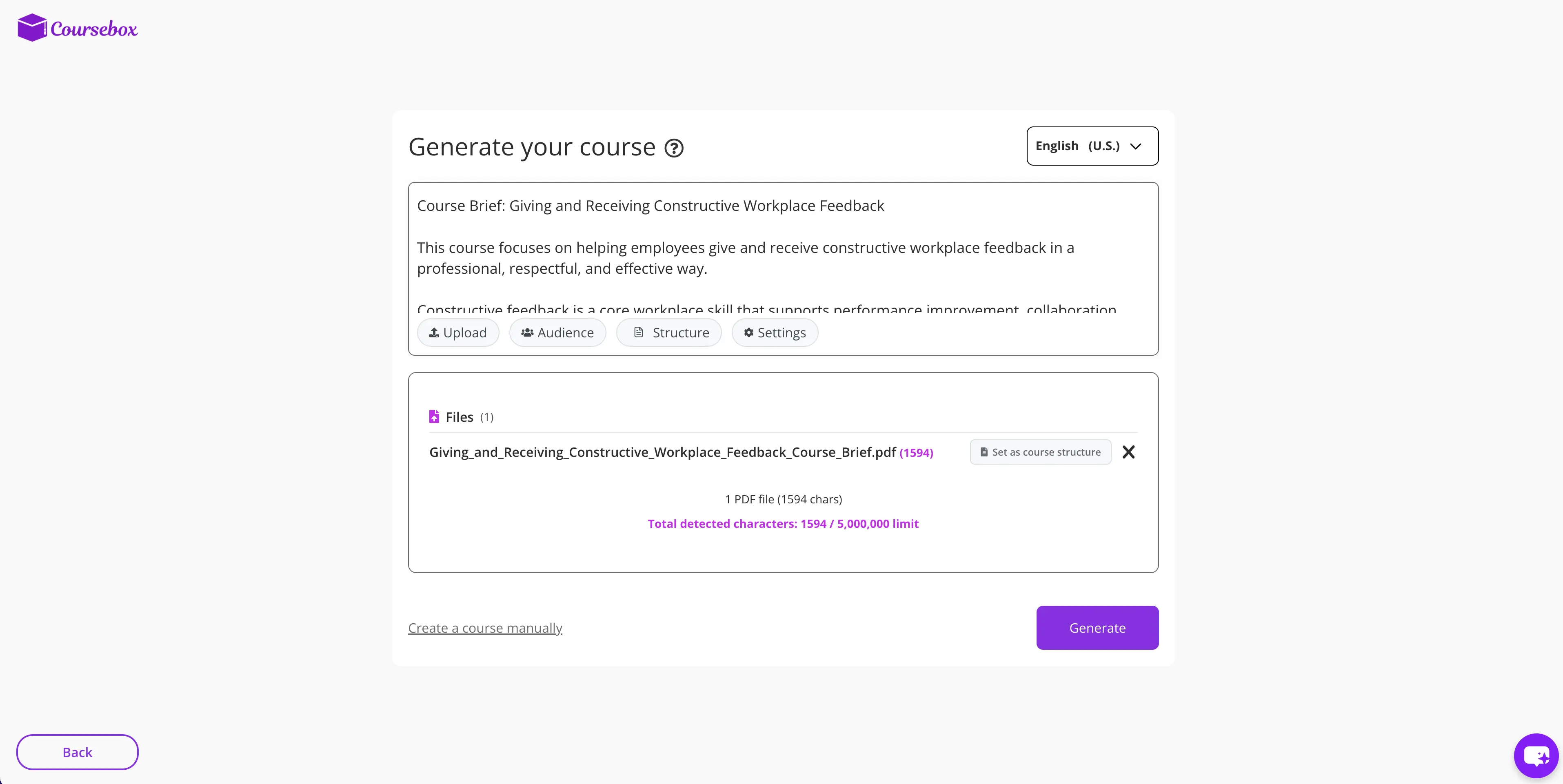
I tested Coursebox AI by creating a short course on giving and receiving constructive workplace feedback using its end-to-end AI course generation workflow. I provided a high-level description of the course intent and audience, then allowed the platform to generate the full course structure, lesson content, and knowledge checks.

From initial prompt to a usable draft course, the process took approximately 15 to 25 minutes, including review and light edits. My focus during testing was on how well Coursebox handled full course creation rather than individual content elements.

In practice, Coursebox felt very efficient at assembling a complete course quickly. The generated output was cohesive and usable as a first pass, though it benefited from instructional refinement before being ready for broader learner use.

Where Coursebox fits from an instructional design perspective

From an instructional design perspective, Coursebox primarily supports the development stage of a learning project, with some overlap into design through its auto-generated structure. It works best when the goal is to produce a complete course quickly rather than to fine-tune instructional sequencing or learning strategy.

Coursebox strongly favors production speed. It significantly reduces the time required to create a full course draft compared to traditional authoring workflows. However, because many instructional decisions are made automatically, experienced IDs may find less opportunity to influence pacing, emphasis, or scaffolding without revising the generated content.

The level of control is moderate. Content and assessments are editable, and updates can be made quickly, but customization is constrained by the platform’s templates and AI-driven structure. This makes Coursebox approachable for SMEs and teams with limited instructional design support, while feeling more restrictive for experienced designers.

From an enterprise and LMS perspective, Coursebox supports delivery-ready course formats and basic LMS deployment. Courses can be published and shared quickly, but governance, version control, and long-term reuse are typically managed outside the platform.

🎯 Where Coursebox works best

  • Rapid creation of internal training courses.
  • SME-led course development with minimal instructional design support.
  • Prototyping or piloting new training programs.
  • Situations where completeness and speed matter more than instructional nuance.

⚠️ Where Coursebox falls short

  • Highly customized instructional experiences.
  • Advanced scenario-based or experiential learning.
  • Courses requiring detailed learner analysis or adaptation.

Pricing

At the time of writing, Coursebox AI plans start at approximately $30 USD per month, with a free tier available. Pricing varies based on usage, features, and scale, particularly for organizations creating multiple courses or supporting multiple contributors.

Final thoughts from hands-on use

From an experienced instructional designer’s perspective, Coursebox AI is a strong accelerator when the goal is to move quickly from idea to course. It excels at speed and completeness, making it useful for internal training, rapid pilots, and early drafts.

When paired with instructional design oversight, Coursebox can help teams work more efficiently by providing a solid foundation to refine and improve. For learning experiences where polish, narrative flow, or learner engagement are critical, it is most effective as a starting point rather than the final step.

5. Scribe

What is Scribe?

Scribe is an AI-powered documentation and process capture tool that automatically generates step-by-step guides by recording on-screen actions. As you complete a task, Scribe captures screenshots and converts actions into written instructions without requiring manual formatting or writing.

The platform is designed to make process documentation fast, consistent, and easy to maintain.

How Scribe fits into an L&D workflow

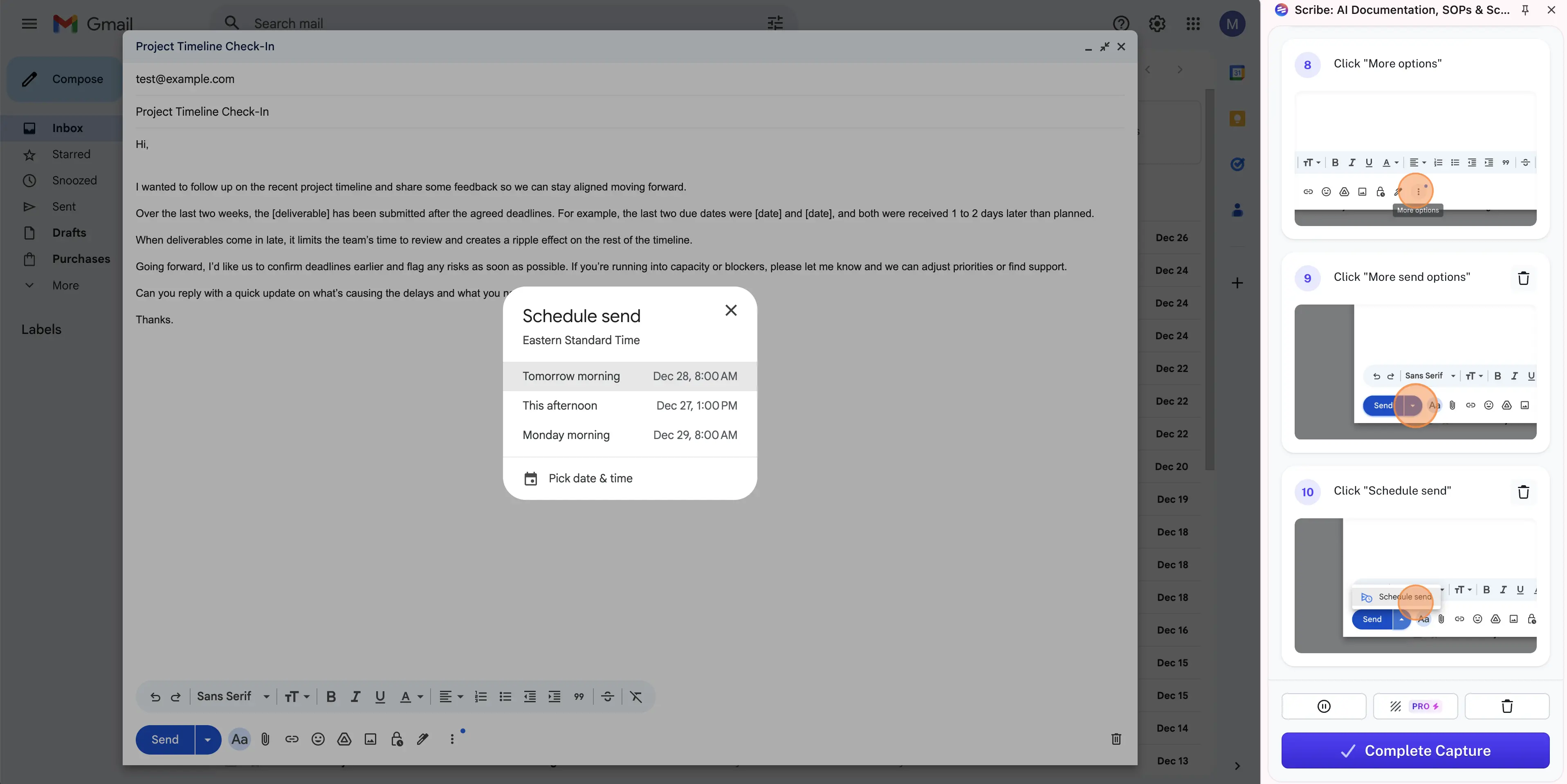
I tested Scribe by creating a step-by-step job aid aligned to the same learning topic used across this review, giving and receiving constructive workplace feedback. Instead of focusing on conceptual instruction, I captured a practical workflow by recording the process of drafting and saving a professional feedback email using an email client.

I recorded the workflow in real time and reviewed how accurately Scribe translated actions into clear written steps and screenshots. From starting the capture to a usable guide, the process took approximately 10 to 15 minutes, including light edits to clean up wording and sequencing.

I tested this using the free version of Scribe and focused on the core capture and editing experience. The resulting guide was clear, readable, and ready for internal use with minimal refinement.

Where Scribe fits from an instructional design perspective

From an instructional design perspective, Scribe fits best within the development and implementation stages of a learning project as a performance support tool rather than a course design solution. It is not intended to teach underlying concepts or reasoning. Instead, it excels at showing learners exactly how to complete a task accurately and consistently.

Scribe strongly prioritizes production speed. Compared to manual documentation methods, it dramatically reduces the time required to create usable job aids. The output often feels near publish-ready for internal use, especially for straightforward workflows.

The level of control is practical and focused. Steps can be edited, removed, or reordered, and screenshots are automatically tied to actions. While formatting and instructional emphasis options are limited, this simplicity keeps the tool accessible to non-designers and supports consistent output.

From an enterprise and LMS perspective, Scribe integrates well as a supporting layer. Guides can be shared, embedded, or linked from LMS platforms and paired with courses, videos, or other instructional assets. Governance and version control are typically managed outside the platform, which is often sufficient for process documentation.

🎯 Where Scribe works best

  • Just-in-time job aids and performance support.
  • Documenting software workflows and repeatable processes.
  • Supporting training with procedural guidance at the moment of need.
  • Standardizing how tasks are performed across teams.

⚠️ Where Scribe falls short

  • Conceptual learning or skill development on its own.
  • Scenario-based or experiential learning.
  • Formal assessments or structured courses.

Pricing

At the time of writing, Scribe plans start at approximately $15 USD per month, with a free tier available. Pricing varies based on plan level and organizational needs, particularly for teams that require advanced sharing, branding, and management features.

Final thoughts from hands-on use

From an experienced instructional designer’s perspective, Scribe is a highly effective performance support tool. It fills a common gap in learning programs by making it easy to capture and communicate workflows clearly and consistently.

When paired with well-designed instruction, Scribe helps bridge the gap between learning and doing. For L&D teams focused on efficiency, consistency, and real-world application, it adds meaningful value without introducing unnecessary complexity.

6. Hyperbound

What is Hyperbound?

Hyperbound is an AI-powered roleplay and simulation platform designed to help learners practice real-world conversations through interactive, scenario-based dialogue with AI personas.

Rather than delivering instructional content, Hyperbound focuses on skill rehearsal by placing learners in realistic conversational situations and allowing them to respond, adapt, and try again in a safe environment.

How Hyperbound fits into an L&D workflow

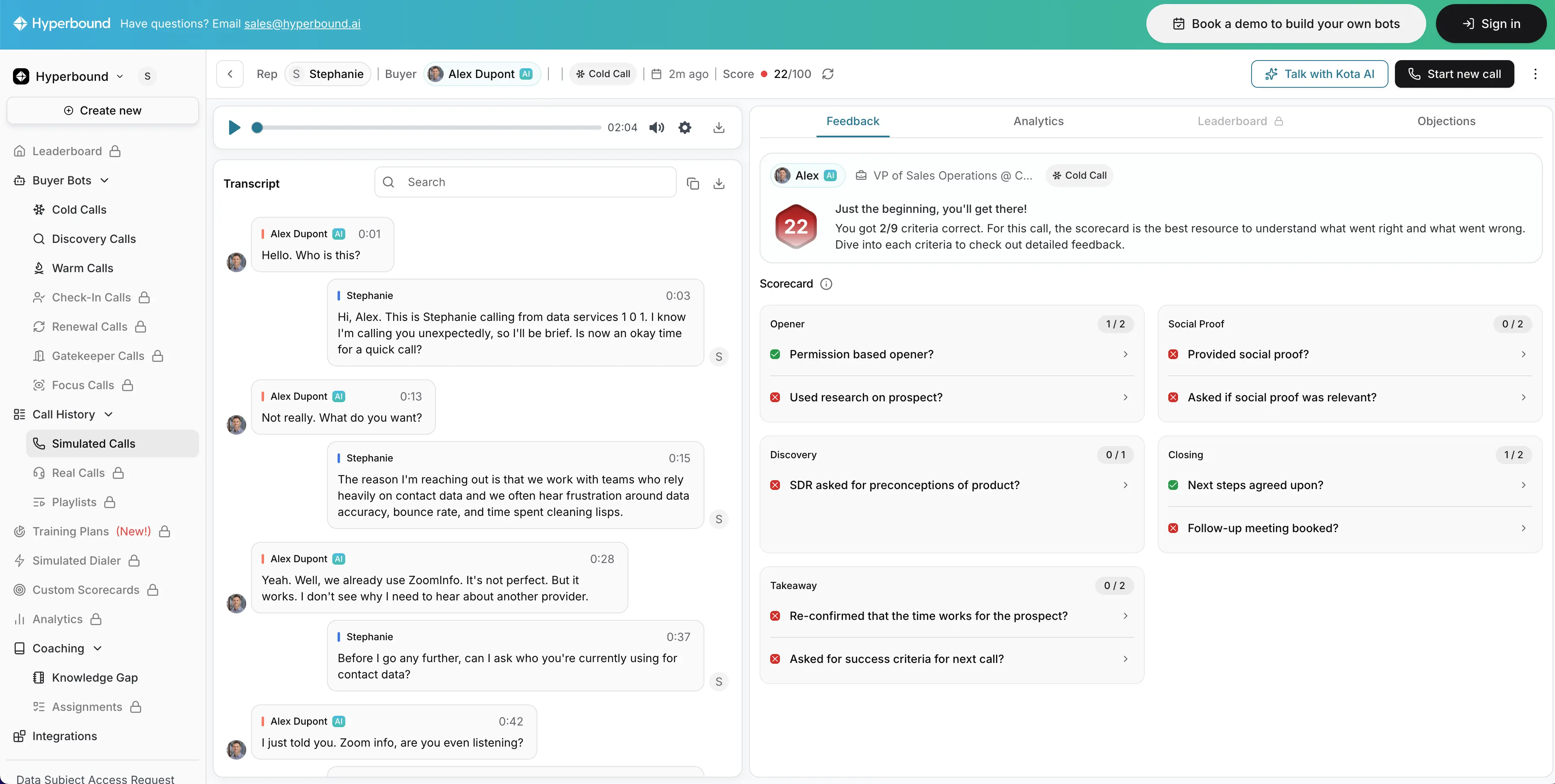
I tested Hyperbound by running multiple AI roleplay scenarios aligned to the same core topic used across this review, giving and receiving constructive workplace feedback. I interacted with scenarios that required responding to resistance, navigating ambiguity, and adjusting tone in real time.

My focus during testing was on how naturally the AI responded, how context-aware the dialogue felt, and whether the experience supported meaningful skill practice rather than simple recall. From setup to completing several roleplay runs, testing took approximately 20 to 30 minutes, which allowed enough repetition to evaluate consistency across scenarios.

In practice, the experience felt realistic rather than scripted. The AI responses adapted to my inputs in ways that encouraged reflection and adjustment, which is critical for soft-skill development.

Where Hyperbound fits from an instructional design perspective

From an instructional design perspective, Hyperbound aligns most strongly with the development and implementation stages of a learning program, particularly for practice and reinforcement. It is not intended to teach foundational concepts. Instead, it works best after learners have already been introduced to frameworks, models, or expectations.

Hyperbound prioritizes learning quality over production speed. Scenarios are ready to use quickly, but the real value lies in the quality of practice they enable. Because conversations feel authentic, learners are more likely to engage seriously rather than treat the experience as a simulation exercise.

The level of control is moderate and focused on scenario selection rather than granular content editing. Instructional designers guide how the tool is framed and integrated into a program, but have limited ability to customize the internal logic of each conversation. This trade-off favors realism and ease of use over deep customization.

From an enterprise and LMS perspective, Hyperbound functions well as a practice layer within a broader learning ecosystem. Scenarios can be assigned alongside courses and videos, reducing reliance on live roleplay while still supporting repeated practice at scale.

🎯 Where Hyperbound works best

  • Practicing difficult or high-stakes workplace conversations.
  • Reinforcing communication and interpersonal skills.
  • Providing psychologically safe environments for practice.
  • Scaling roleplay without relying on live facilitators.

⚠️ Where Hyperbound falls short

  • Teaching foundational concepts from scratch.
  • Delivering structured instructional content.
  • Replacing facilitation in complex or highly nuanced coaching situations.

Pricing

Hyperbound offers pricing based on organizational needs and usage. At the time of writing, pricing details are provided through direct consultation rather than published plans, which is typical for platforms focused on enterprise and team-based deployments.

Final thoughts from hands-on use

From an experienced instructional designer’s perspective, Hyperbound stands out for the realism of its roleplay experience. The ability to practice similar skills across varied scenarios supports stronger transfer to real-world situations.

When paired with clear instructional framing and follow-up, Hyperbound adds meaningful depth to soft-skill learning programs. It works best as a practice layer that complements instructional content rather than replacing it.

7. Second Nature

What is Second Nature?

Second Nature is an AI-powered conversational roleplay and coaching platform designed to help learners practice sales and customer-facing conversations through realistic simulations paired with automated feedback.

The platform is built specifically for skill development in high-stakes conversations, with a strong emphasis on messaging, tone, and objection handling rather than content delivery.

How Second Nature fits into an L&D workflow

I tested Second Nature by running multiple AI-driven roleplay scenarios focused on conversational skill practice, including objection handling and response refinement. I completed several roleplay sessions to observe how the AI adapted to different responses, how feedback was delivered, and how effectively the platform reinforced desired behaviors.

From setup to completing multiple scenarios, testing took approximately 20 to 30 minutes. This allowed enough repetition to evaluate how learning progressed across attempts rather than judging the experience based on a single interaction.

In practice, Second Nature felt structured and intentional. The roleplay experience was guided, and the feedback after each interaction helped clarify what was working, what needed adjustment, and where responses could be improved.

Where Second Nature fits from an instructional design perspective

From an instructional design perspective, Second Nature aligns most strongly with the development and implementation stages of a learning program, particularly for practice, reinforcement, and coaching. It works best when learners already understand the fundamentals of the conversation they are practicing.

Second Nature prioritizes learning quality over content production speed. Scenarios are available immediately, but the value lies in repeated practice and feedback loops rather than one-time exposure. The built-in coaching insights encourage learners to reflect and refine their responses over time.

The level of control is moderate and focused on structured coaching rather than open-ended exploration. Expectations for learner responses are clear, feedback is consistent, and performance criteria are embedded into the experience. This structure makes the platform easier to deploy at scale, though it offers less flexibility for highly customized scenarios.

From an enterprise and LMS perspective, Second Nature fits naturally into sales enablement ecosystems. Scenarios can be assigned alongside LMS-hosted content, and performance data can be used to support coaching conversations and ongoing skill development.

🎯 Where Second Nature works best

  • Sales conversation practice and objection handling.
  • Reinforcing consistent messaging across sales teams.
  • Scaling coaching without relying solely on managers.
  • Supporting skill refinement through repeated practice.

⚠️ Where Second Nature falls short

  • Open-ended conversational exploration.
  • Teaching foundational concepts without prior instruction.
  • Non-sales or non-customer-facing communication skills.

Pricing

Second Nature offers pricing primarily through enterprise and team-based plans. At the time of writing, pricing is provided through direct consultation rather than publicly listed tiers, which aligns with its focus on sales enablement and organizational deployment.

Final thoughts from hands-on use

From an experienced instructional designer’s perspective, Second Nature excels as a coaching-focused roleplay tool. Its strength lies in how clearly it reinforces desired behaviors and provides actionable feedback, making it particularly valuable for sales enablement and customer-facing roles.

When paired with instructional content that introduces concepts and frameworks, Second Nature supports meaningful skill improvement through structured practice. It is best positioned as a reinforcement and coaching layer rather than a standalone learning solution.

8. ElevenLabs

What is ElevenLabs?

ElevenLabs is an AI-powered voice generation platform focused exclusively on producing highly natural-sounding text-to-speech audio. Its core strength lies in realistic voice quality, broad language and accent support, and extremely fast audio generation.

Unlike many AI learning tools, ElevenLabs does not attempt to generate instructional content, visuals, or structure. Its role is intentionally narrow and focused on high-quality narration.

How ElevenLabs fits into an L&D workflow

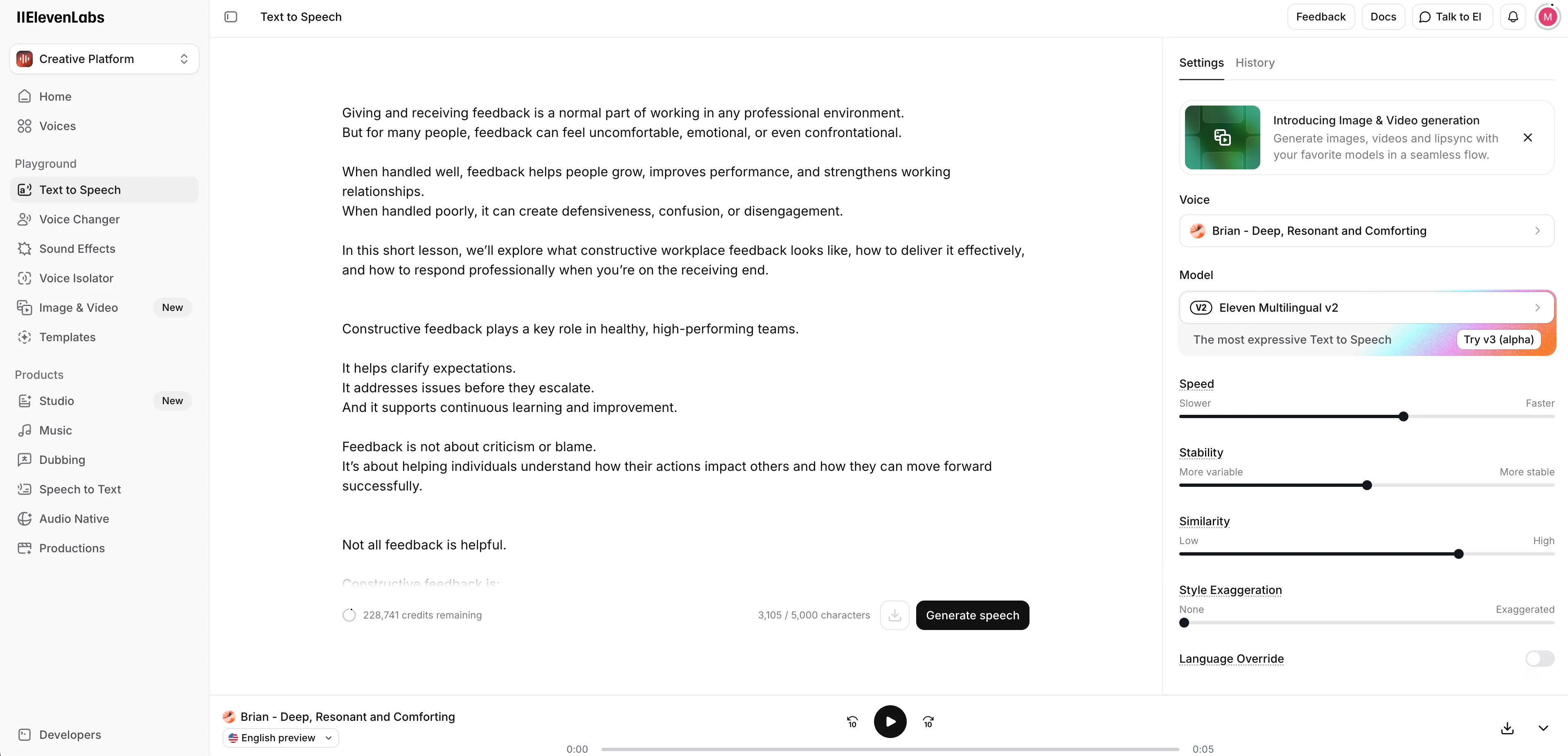
I tested ElevenLabs by generating narration for instructional content aligned to the same topic used across this review, giving and receiving constructive workplace feedback. I pasted a prepared narration script into the platform and tested multiple voices to evaluate realism, tone, and pacing.

I also regenerated audio after making small script changes to assess turnaround time and ease of iteration. From initial input to downloadable audio files, the process took approximately 5 to 10 minutes, including voice selection and review.

In practice, the interface felt intuitive and frictionless. Generating, reviewing, and downloading audio required very little setup, which made it easy to iterate quickly as the script evolved.

Where ElevenLabs fits from an instructional design perspective

From an instructional design perspective, ElevenLabs fits squarely within the development stage of a learning project as a voice production tool. It supports narration for structured learning content, audio reinforcement for microlearning, and voice layers for slide-based or video-based training.

ElevenLabs strongly prioritizes production speed without compromising perceived quality. Audio generation is nearly immediate, and the output consistently sounds human rather than synthetic. This reduces the cognitive friction learners often experience with AI narration and helps maintain credibility and engagement.

The level of control is high within its defined scope. Designers can select from a large library of natural-sounding voices, choose from many languages and accents, and regenerate audio easily when scripts change. Because the platform is audio-only, all editing happens at the script level, which keeps the workflow efficient.

From an enterprise and LMS perspective, ElevenLabs integrates indirectly but easily into learning ecosystems. Audio files can be downloaded and embedded into LMS courses, videos, presentations, or authoring tools. Governance, reuse, and versioning are managed outside the platform, which is typical for voice-only tools.

🎯 Where ElevenLabs works best

  • High-quality AI narration for training and learning content.
  • Rapid voiceover updates without re-recording.
  • Multilingual audio generation at scale.
  • Teams that need voice-only AI capabilities without video or course generation.

⚠️ Where ElevenLabs falls short

  • Video creation or visual storytelling.
  • Instructional content generation or structuring.
  • Interactive or experiential learning.

Pricing

At the time of writing, ElevenLabs offers a free tier with usage limits. Paid plans start at approximately $5 USD per month, with higher tiers available for increased usage, advanced features, and commercial licensing. Pricing scales based on voice generation volume and plan level.

Final thoughts from hands-on use

From an experienced instructional designer’s perspective, ElevenLabs stands out for how human the AI voices sound, how quickly audio can be generated, and how easy the platform is to use. It is a strong choice for teams that need reliable, affordable AI narration with minimal overhead.

Because it focuses exclusively on audio, ElevenLabs works best as a supporting layer within a broader learning production workflow rather than as a standalone solution.

9. Descript

What is Descript?

Descript is an AI-powered audio and video editing platform that allows users to edit media by editing text. Its core capabilities include transcription-based editing, filler-word removal, AI voice generation, and built-in screen recording.

Rather than generating instructional content, Descript focuses on helping teams refine, clean up, and iterate on audio and video efficiently without relying on traditional timeline-based editing tools.

How Descript fits into an L&D workflow

I tested Descript by editing a short training-style explainer video on giving and receiving constructive workplace feedback. I uploaded a screen-recorded video with narration and intentionally included natural pauses, filler words, and minor re-records to evaluate how well Descript handled real-world instructional media.

I removed sections by editing the transcript, applied filler-word removal, and tested Descript’s AI speaker by replacing my narration with an AI-generated voice. From upload to a clean, usable video, the process took approximately 20 to 30 minutes, including experimentation with editing and voice replacement.

In practice, the text-based editing workflow felt intuitive and efficient. Making changes through the transcript was significantly faster than working on a traditional timeline, especially for small but frequent revisions.

Where Descript fits from an instructional design perspective

From an instructional design perspective, Descript fits most strongly within the development stage of a learning project as a media editing and refinement tool. It supports polishing instructional videos, improving pacing and clarity, and iterating quickly on draft content during review cycles.

Descript prioritizes production efficiency without affecting instructional intent. Changes that would normally slow down development can be made quickly, which is especially valuable when incorporating SME feedback or updating content regularly.

The level of control is high. Instructional designers can edit audio and video precisely through text, remove filler words automatically, replace narration using AI voices, and record screens directly within the platform. Because Descript focuses on editing rather than generation, it works best when paired with other tools that handle content creation or course structure.

From an enterprise and LMS perspective, Descript fits cleanly into modern L&D workflows. Videos and audio can be exported and embedded into LMS platforms or authoring tools, and collaboration features support iterative development across teams.

🎯 Where Descript works best

  • Editing and refining training videos or screen recordings.
  • Iterating quickly on narrated instructional content.
  • Updating or replacing narration without re-recording video.
  • Tight review cycles where turnaround time matters.

⚠️ Where Descript falls short

  • End-to-end course creation.
  • Instructional content generation or design.
  • Interactive or scenario-based learning.

Pricing

At the time of writing, Descript offers a free plan with limited features. Paid plans start at approximately $24 USD per month, with higher tiers available for teams that need advanced collaboration, AI voice features, and increased usage.

Final thoughts from hands-on use

From an experienced instructional designer’s perspective, Descript is a highly effective editing and iteration tool. It shines in workflows where content changes frequently, feedback cycles are tight, and traditional video editing would slow progress.

While it does not replace AI video generators or authoring tools, Descript pairs exceptionally well with them to polish and refine learning assets. For L&D teams balancing quality with speed in 2025 and 2026, it adds meaningful efficiency to the production process.

How these tools work together

No single tool in this review is meant to cover the entire learning lifecycle. Each supports a different part of the work instructional designers already do.

Design-focused tools like Mindsmith AI help establish structure and alignment early on. Coursebox AI accelerates full course drafts when speed matters. Video and voice tools such as Synthesia, Colossyan, ElevenLabs, and Descript reduce production and iteration time once content decisions are made.

Scribe supports performance at the moment of need through clear job aids, while Hyperbound and Second Nature add a critical practice layer by allowing learners to rehearse real conversations and receive feedback.

Used together, these tools form a layered workflow. Instructional designers remain responsible for learning strategy and quality, while AI reduces mechanical effort, speeds up production, and makes practice and iteration more scalable.

What this all means for L&D teams in 2026

The conversation about AI in L&D is shifting. It’s no longer about whether the field will survive, but about how it adapts.

A growing number of L&D professionals believe the field will continue to thrive by evolving its role.

That evolution doesn’t come from automation alone. It comes from using AI to reduce friction, create space for better thinking, and support more intentional learning design.

As learning strategist Dr. Philippa Hardman has noted, over the next year or two we’re likely to see a clearer divide between teams that use AI simply to move faster, and teams that use it to build more thoughtful, personalized, and evidence-based learning ecosystems.

That distinction matters more than any individual tool.

The most effective L&D teams won’t be the ones adopting AI the fastest. They’ll be the ones taking the time to understand where AI strengthens their work and where human judgment still matters most.

Used well, AI becomes a supporting layer, one that helps instructional designers focus less on production friction and more on learning quality, context, and impact.

For teams that are curious but cautious I suggest staying informed as the tools, and the role of L&D, continue to evolve.

About the author

Strategic Advisor

Kevin Alster

Kevin Alster is a Strategic Advisor at Synthesia, where he helps global enterprises apply generative AI to improve learning, communication, and organizational performance. His work focuses on translating emerging technology into practical business solutions that scale.He brings over a decade of experience in education, learning design, and media innovation, having developed enterprise programs for organizations such as General Assembly, The School of The New York Times, and Sotheby’s Institute of Art. Kevin combines creative thinking with structured problem-solving to help companies build the capabilities they need to adapt and grow.

Go to author's profile
Get started

Make videos with AI avatars in 140+ languages

Try out our AI Video Generator

Create a free AI video
Create free AI video
Unmute

Trusted by 50,000+ teams.

faq

Frequently asked questions

Where does Synthesia fit in an L&D workflow?

Synthesia fits naturally within the development and implementation stages of your L&D workflow, transforming written content into professional training videos without traditional production complexity. After you've defined learning objectives and structured your content, Synthesia takes your scripts and converts them into polished videos featuring AI avatars, making it accessible for instructional designers who understand learning but aren't video specialists.

The platform works best when integrated with your existing learning ecosystem. You can embed Synthesia videos directly into your LMS, pair them with assessments from authoring tools, and update content quickly when training needs change. This approach lets you focus on instructional quality while Synthesia handles the technical video production, dramatically reducing the time from concept to finished training material.

How can AI video help me update and localize training content quickly across regions?

AI video revolutionizes content updates and localization by eliminating the need to reshoot entire videos when information changes or when expanding to new markets. With Synthesia, you simply edit the script text to update content, and the platform regenerates the video with your changes, maintaining consistency across all your training materials while saving weeks of production time.

For global teams, localization becomes remarkably straightforward. You can translate your script into over 140 languages, select appropriate AI avatars and voices for each region, and generate culturally relevant versions of the same training without coordinating multiple production teams. This capability ensures your training maintains its effectiveness across different markets while respecting local preferences and communication styles.

Can I embed Synthesia videos into my LMS and pair them with quizzes or branching built elsewhere?

Yes, Synthesia videos integrate seamlessly with most modern LMS platforms through standard embedding methods, allowing you to incorporate them into your existing learning pathways. The videos work as standalone content pieces that you can surround with interactive elements like quizzes, assessments, and branching scenarios created in your preferred authoring tools.

This modular approach gives you flexibility in designing comprehensive learning experiences. You might use Synthesia for explainer videos or scenario demonstrations, then leverage tools like Articulate Rise or Adobe Captivate for interactive assessments and decision trees. The combination creates engaging, multi-faceted training programs while maintaining the production efficiency that AI video provides.

Is Synthesia suitable for scenario-based simulations or highly interactive learning?

Synthesia excels at creating clear, consistent video content for explaining concepts, demonstrating processes, and delivering training messages, but it's not designed for complex branching simulations or real-time interactivity. The platform focuses on high-quality video production rather than interactive scenario engines, making it ideal for the video components within a broader learning experience.

For scenario-based learning, Synthesia works best when paired with specialized simulation tools. You might use Synthesia to create introduction videos that set up scenarios, explanation videos that provide feedback, or demonstration videos showing correct approaches. Then combine these with dedicated roleplay platforms like Hyperbound or Second Nature for the interactive practice elements, creating a comprehensive learning experience that leverages each tool's strengths.

How should L&D teams choose the right mix of AI tools for design, development, practice, and voiceover?

Start by mapping your AI tools to specific stages of your instructional design process rather than trying to find one tool that does everything. For the design phase, tools like Mindsmith AI help structure courses and learning objectives. During development, Synthesia handles video creation while Scribe captures process documentation. For practice and reinforcement, platforms like Hyperbound enable realistic roleplay scenarios.

The key is selecting tools that complement rather than compete with each other. Consider your team's primary pain points first. If video production bottlenecks your workflow, prioritize Synthesia. If course design takes too long, start with Mindsmith. Build your toolkit gradually, ensuring each addition integrates smoothly with your existing systems and genuinely reduces friction in your workflow rather than adding complexity.