




5 Ways to Use AI in Sales Enablement


Practice real sales conversations with Interactive Avatars.
Gartner predicts that by 2029, organizations with AI-driven sales enablement will move through sales stages 40% faster than those still using traditional enablement methods.
At Synthesia, we’ve seen this firsthand. We’re an AI company whose mission is to help people work better. That means our teams are constantly experimenting with ways to improve our product, and simultaneously, their own ways of working.
5 ways to transform sales enablement with AI
Here are five ways our sales team has successfully integrated AI into their enablement.
Yes, we're an AI company telling you to use AI in your sales enablement. But you don't need to take our word for it that AI can transform your enablement. Our customers are proof it works.
1. Automate account research
A CSM can be managing dozens, or even hundreds, of accounts. If your team is expected to deliver high-touch service at that scale, that's a lot of information to keep straight. To stay competitive, CSMs need to stay current on their accounts: what's changing in their industry, any company-wide announcements, any open tickets?
Pulling that information together before a call, and finding the time to do it, can be a sisyphean task. One of our CSMs found a solution, and then shared it with the team. Here's how it works. They use an LLM to generate a weekly account intelligence briefing.
Their automated workflow searches the web for news on each account from the past 7 days, including funding, leadership changes, layoffs, and any AI or technology initiatives relevant to your product. It cross-references internal sources for deal updates, account health scores, and champion changes.
Try it for yourself. Customize the prompt below, then automate the workflow in your LLM.
The output is 2-3 talking points that can be quickly read and worked into the next call or email. This kind of peer-driven problem solving, where one person's workflow becomes the whole team's practice, keeps the team both more informed and more responsive as account lists grow.
It's also an excellent example of why enablement solutions created by, or with, teams yield the best results. In this case, the CSM identified a gap, designed and tested a solution that was feasible (notice it's not a report, but something you can read in 5), and then the team decided to systematize and operationalize the solution.
This approach can be modified and applied across sales. B2B reps could use it to automate industry research if they're selling into multiple verticals. The goal is to find a way to synthesize information so it's applicable to whatever's in front of them.
2. Share product feedback
Decades of research show that high-performing organizations are able to collect customer (and prospect) intelligence, and ensure it gets shared with the right teams. When feedback flows freely between teams, it's a competitive advantage.
AEs, SDRs, and CSMs spend their weeks in meetings hearing this customer intelligence. In each call, there's feedback, a feature wishlist, a workaround to a problem they're still waiting to be solved. (I know, I've been on the other side of those calls, sharing each of those.)
What happens to that feedback? Ideally, it would be collated and shared with the appropriate team internally. But having a large volume of feedback come in, in an unstructured way (if at all) or disparate Slack channels, isn't the most helpful. That's why our solutions team designed a way to solve for this.
.webp)
Using our AI-powered tech stack, they've automated scanning and summarizing of call transcripts in our intelligence platform, Gong. Two things then happen. One, product and feature owners are notified of relevant feedback via a Slack integration, and second, a weekly report highlighting patterns and insights with customer quotes is generated in Notion for the broader team.
Not only does this save our sales team significant time, but it also reduces the friction between getting quality feedback and doing something with it. There's no interpretation of what was or wasn't said, the transcript documents it (and when in doubt, there's the call recording to reference).
3. Keep sales training relevant
It's a tale as old as workplace learning. You design a training, get it localized, deliver it, and then, something changes. A product is re-named (and re-named, and re-named). A tool is swapped out or a workflow changes, and that leaves you sitting on stale content. The old version is still circulating until you can revise it, leaving reps providing outdated pricing or missing feature updates.
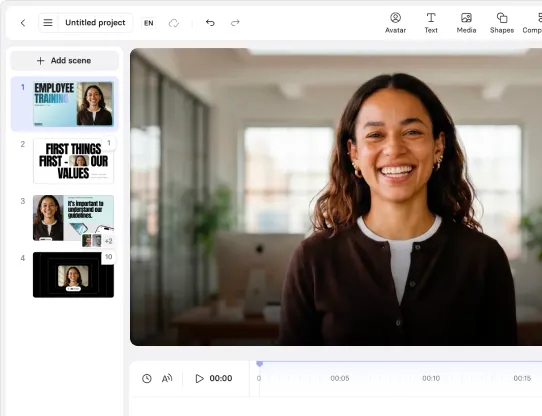
That's why our team uses Synthesia to build informational videos, from quick product updates to onboarding overviews.
Our enablement team runs monthly product update sessions the same way: they create a short video covering what's new, share it across the company, and then create a separate version for external distribution to customers.
Druva, a data security cloud platform, uses Synthesia's Studio to keep training current. They can easily update videos any time a product, or even terminology, changes, ensuring everyone has the most accurate information.
4. Practice before the call
Managers are often responsible for coaching and providing feedback to their reps. The problem is, managers are swamped. They're managing more direct reports than ever before. And that's not to mention that, most managers are inconsistently trained, if at all, on how to coach and give feedback.
That's why we launched Roleplay Sessions, to give reps the opportunity to practice critical conversations with Interactive Avatars and get coaching — before the real call.
Hear more from our CEO, Victor Riparbelli.
Our SDRs, AEs, and managers helped design Roleplay Sessions, giving feedback on the quality of the coaching and shaping the rigor of the evaluation process. They also continue to use it to uplevel their skills. As Will Eves, Senior Director of Sales at Synthesia, explains,
If your reps aren't practicing with you, they're practicing on your customers. We used Roleplay Sessions to make sure our own team's first rough attempt at pitching this product happened with an AI, not with a prospect.
Here's how it works.
- Sales enablement partners with our experts to design a compelling scenario, like how to cold call, tailored to your organization.
- Reps jump on a call with one of our Interactive Avatars to practice. The avatars push back, ask follow-up questions, and listen (unless reps are talking too much, in which case the avatars let them know they're wasting its time). Just like a real cold call.
- Coaches (also Interactive Avatars) ask reps to assess how the call went before delivering an overall score, plus a breakdown of how they performed across the skills being practiced.
- Reps try again, immediately, or whenever they want to practice building their skill.
- Managers monitor results, using their 1-on-1s for strategic follow-up coaching.
Try it for yourself below.
If you're wondering, yes, reps do opt into more coaching. In a pilot with a Fortune 10 company, 68% of reps returned for repeat practice. We saw the same pattern internally, with 59% of our SDRs and AEs coming back for more practice in a recent test.
5. Measure skill progress
One of the smartest ways to use AI in sales enablement is to help everyone make more data-driven decisions. It's always been hard to track skill progression in an org, especially for managers who might be looking for more signals to compare performance and consider development opportunities.
Whenever you're using an AI tool for skill building, it should help you measure more than just engagement. That's feedback our enablement team ensured made it into our Roleplay Sessions product.
Data from every Session is aggregated into dashboards tracking progress and performance outcomes, filterable by manager, department, or any HRIS property you've configured. Managers can review call transcripts and feedback for their own reports, along with metrics like skill uplift, the change from a learner's first completed attempt to their best.
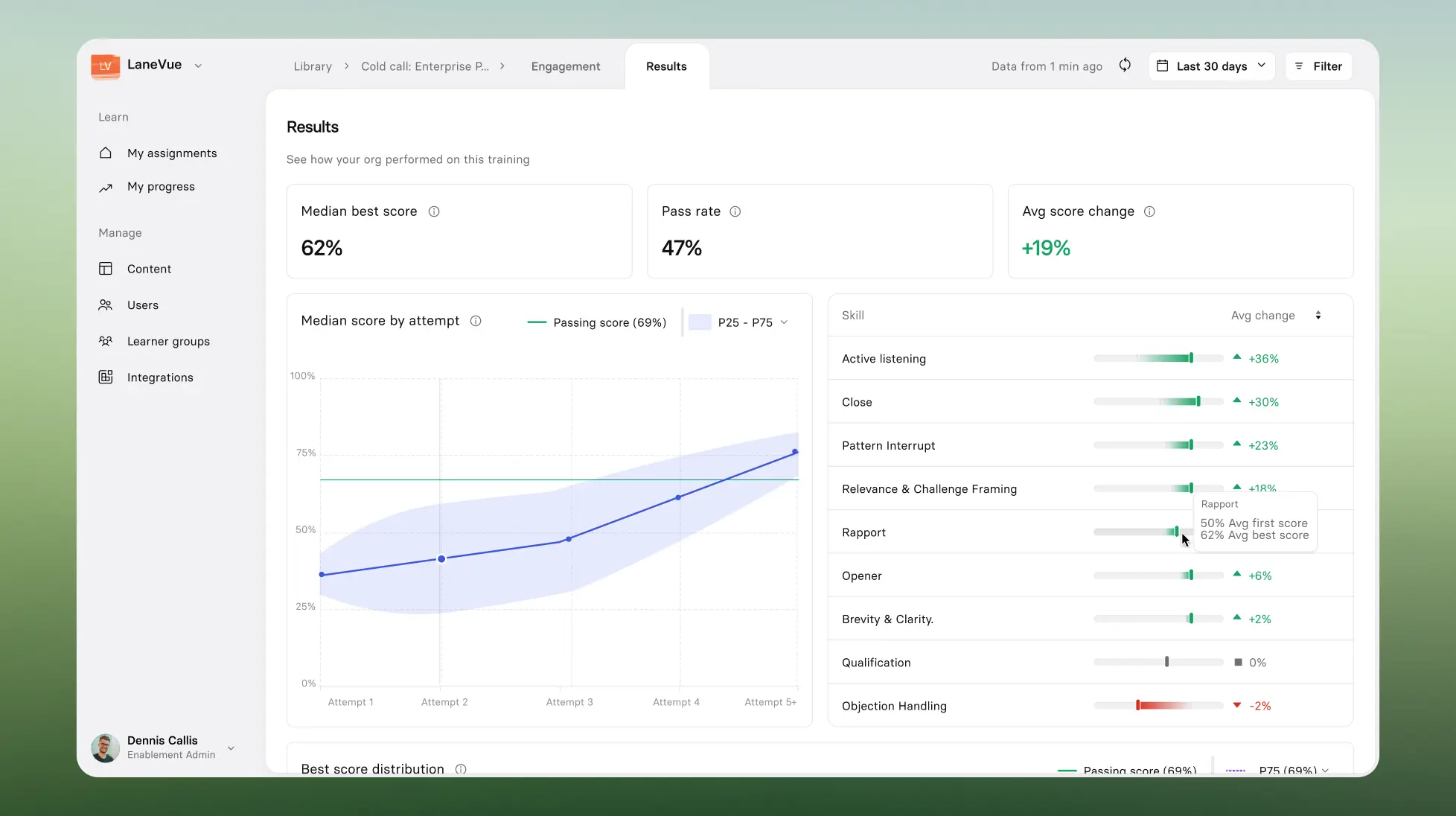
These analytics also allow you to validate if skill gaps you've identified, are indeed gaps, and at the same time, validate if they are improving. The goal is to give managers, enablement, and even leaders the information they need to do their job better.
As our CRO, Ken Lawshe explains,
Every leadership team right now is staring down the same problem: the skills your people need are changing faster than you can train for them. Practice has always been the piece nobody could scale, it needed a manager's time, and managers don't have enough of it. That's exactly the gap we built Roleplay Sessions to close, and we used it ourselves first.
Where to start
It is easy to get carried away with integrating AI into your sales enablement plan. You read a list like the one above and think, "I should do all of these things." I would advise against that.
Each of these recommendations for integrating AI into your enablement is a different scale and scope of work. What they have in common is that they all started with a problem that needed to be solved. That’s where I recommend you start.
Look at your enablement plan and identify where there’s friction: what could be working better? The "best" enablement plans aren't the ones using the most AI. They're the ones using AI strategically, whether that’s to automate administrative tasks, share intelligence and feedback, or close skill gaps.
If you’re interested in learning more about how Synthesia can support your sales enablement plan, schedule some time with our team. We’d be happy to share more about what we’ve learned.
Amy Vidor, PhD, is the Learning and Development Evangelist at Synthesia, where she researches learning trends and helps organizations apply AI at scale. With 15 years of experience, she has advised companies, governments, and universities on skills.
Frequently asked questions
What is AI in sales enablement?
Sales enablement is a dynamic organizational capability with three layers working together: diagnostics (what's working and what isn't), operations (how you communicate information), and development (how you change behavior).
AI in sales enablement is how you use AI to make each of those layers more effective and efficient, so you can drive rep performance.
Does AI replace sales enablement teams or managers?
No. Sales enablement teams still own the strategy and roadmap, and managers are still accountable for rep performance.
AI can reduce the administrative burden of diagnostics and operations, and scale personalized practice for development. What it can't replace is human judgment.
What are the benefits of AI in sales enablement?
Right now, sales teams are primarily seeing benefits from AI in two measurable areas: efficiency and resource savings. Teams are able to automate administrative work, whether that's researching accounts, drafting email responses, or compiling new opportunities.
Where I expect teams will see the most uplift from AI next is in measurable behavior change, not just saving time and resources, but working smarter and more strategically, and being better prepared for critical conversations.
What are some examples of AI in sales enablement?
Our sales teams use AI in sales enablement for a variety of tasks. These include: using an LLM to generate weekly account research briefings, automatically routing customer feedback from sales calls to the right product owner, using AI video to keep training current as things change, and giving reps a place to practice difficult conversations with AI before a real call.
Do you need new tools to use AI in sales enablement?
Do you need new tools to use AI in sales enablement?
Not always. You can often use company-wide tools, like an LLM, to create workflows like the ones shared above: automating account research or routing feedback. Sales-specific tools, like CRMs, are also consistently being updated with AI capabilities (though those can vary widely) to help you automatically track action items or next steps from calls.
In some cases, however, AI-native tools are the best solution. Tools built with AI as the core architecture, like Synthesia, offer more capability than patchwork solutions.

.webp)