Pricing that scales with your needs

10 minutes of video creation or dubbing
3 survey responses
500 credits to spend on anything


What are Credits?
Credits are now the shared currency across all AI usage-based features - one common pool for everything you create.
10 minutes of video creation or dubbing
3 survey responses
500 credits to spend on anything


What are Credits?
Credits are now the shared currency across all AI usage-based features - one common pool for everything you create.
10 minutes of video creation or dubbing
3 survey responses
500 credits to spend on anything





Roleplay Training

See what plan best fits your needs
Tell us roughly what you make each month, we’ll point you at the right plan.
Estimates only. Actual credit use depends on what’s in your videos – avatars, B-roll, motion graphics and dubbing each count differently.
Basic
The monthly allowance covers youStarter
1,250credits / monthPro
6,000credits / monthEnterprise
Your volume needs a custom plan

Compare plans
$0/mo
$29/mo
$89/mo
Custom
The maximum number of seats your workspace includes.
1 editor


1 editor, 3 guests
1 editor, 5 guests
Custom # of editors & guests
The free allowance includes 10 minutes of video a month. Paid plans add credits on top, and the number shown is the most extra video those credits can make. Dubbing and surveys use the same credits.
10 minutes of video / month
Unlimited minutes of video
Invite guest users to get feedback on your videos via comments.
The number of times shared Roleplays can be played each month across your workspace/organisation via public link, embed or SCORM. Learners who sign in with a seat aren’t limited by this. The number of sessions is subject to change.
10 sessions / month
10 sessions / month
10 sessions / month
25 sessions / month. Shared across all organisation workspaces.
Invite team members to your unified workspace.
Collaborate on videos with your team and edit them together in real time.
The Basic, Starter, and Pro plans include a limited number of AI avatars. The Enterprise plan includes our full selection of avatars.
9 AI avatars
125+ AI avatars
180+ AI avatars
240+ AI avatars




Create your own custom AI avatar (your digital twin).
3 personal avatars
5 personal avatars
Unlimited personal avatars (subject to reasonable consumption and compute)
The creation of a Studio Express-1 avatar is a paid add-on ($1000/year) for annual plan users only. Studio Express-1 Avatars can take up to 10 days to process.
Paid add-on ($1,000/year)
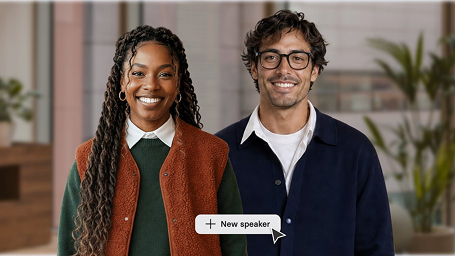

Add two or more avatars in a scene.
Customize avatars to talk in any environment and outfit. Then prompt them to act (each b-roll asset with action costs 230 credits).
Get access to over 160 languages and voices, including various narration styles and local accents.
160+ languages & voices
160+ languages & voices
160+ languages & voices
160+ languages & voices
Translate entire Synthesia videos into numerous languages in one click.


Clone your own voice and pair it with your custom avatar.
10 minutes of dubbing / month
Custom
Output languages and locales available for translation, including regional variants like Spanish (Mexico) and Portuguese (Brazil).
70+ languages
70+ languages
70+ languages
140+ languages
Preserve the original speaker's voice, accent, and tone in the dubbed version.
Match mouth movements to the translated audio. Uses 2× credits when enabled.
Automate dubbing workflows and translate video at scale through the API.
Edit the original or translated transcript.
Define brand terms, product names, and jargon to keep messaging consistent and pronunciations correct.
Replace the cloned voice for any speaker with a stock voice or voice clone of your choice.
Track who edited the transcript, when changes were made, and what changed.
Automate video creation with Synthesia API.
Up to 360 minutes of video / year, deducted from the plan's usage limits.
360 minutes of video / year included. (Additional usage available as a paid add-on)
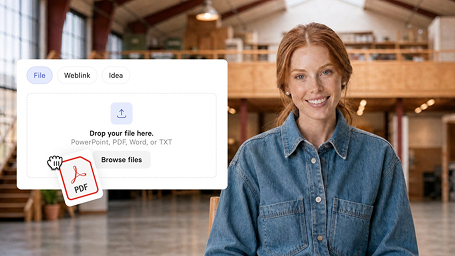

Automatically create video scripts with ChatGPT-like prompts.
Add clickable call-to-actions and branching paths to your videos so viewers stay engaged and take the actions you want.
Add quizzes to your videos and show viewers their final score.


Easily apply your company's style to all videos created in Synthesia.
Upload your own images, videos, infographics, and more.
The number of video assets you can generate each month using third-party model integrations. Each generated asset also consumes credits. The number of generations is subject to change.
3 / month
Chrome extension for professional, fully editable screen recordings made in minutes.
Create hundreds of personalized videos in minutes — pick a template, upload your .csv or .xlsx file, and hit "Generate."
Select from a list of pre-designed video templates.
60+ templates
60+ templates
60+ templates
60+ templates
Our creative team will design a custom video template for your brand.
Get access to royalty-free images, videos, icons, shapes, and more.
Limited royalty-free content including videos and images from Pexels and music from Soundstripe
Royalty-free content including videos and images from Getty Images and Pexels, music from Soundstripe and icons from Icons8
Royalty-free content including videos and images from Getty Images and Pexels, music from Soundstripe and icons from Icons8
Royalty-free content including videos and images from Getty Images and Pexels, music from Soundstripe and icons from Icons8
Upload your own fonts.
Automatically add closed captions to your videos.
Get access to a selection of royalty-free soundtracks.
Upload your own voiceovers in place of a text script.
Upload your PowerPoint presentations and turn them into videos.
Download your videos in Full HD, 1920 x 1080.
The player that lets your viewers watch videos in preferred language.
Export your content as a SCORM package and easily upload it into your LMS. With all translated versions.
Embed your videos on your LMS, LXP, website, etc. and have them automatically update with your edits.


When you embed a video or share it using a link, it will automatically update with your latest edits.
Add your logo to the branded video page.
Add a call-to-action button to your video page.
Get live support via chat on Synthesia's website.
A dedicated Customer Success Manager will guide you through a personalized onboarding process.
Get a fast and secure login for everyone on your team.
We apply content moderation to all Synthesia videos.
Building video into your product?

10 minutes of video creation or dubbing
3 survey responses
500 credits to spend on anything
What are Credits?
Credits are now the shared currency across all AI usage-based features - one common pool for everything you create.
10 minutes of video creation or dubbing
3 survey responses
500 credits to spend on anything

What are Credits?
Credits are now the shared currency across all AI usage-based features - one common pool for everything you create.
10 minutes of video creation or dubbing
3 survey responses
500 credits to spend on anything
Trusted by over 90% of Fortune 100 companies








Roleplay Training
See what plan best fits your needs
Tell us roughly what you make each month, we’ll point you at the right plan.
Estimates only. Actual credit use depends on what’s in your videos – avatars, B-roll, motion graphics and dubbing each count differently.
Basic
The monthly allowance covers youStarter
1,250credits / yearPro
72,000credits / yearEnterprise
Your volume needs a custom planCompare plans
$0/mo
$18/mo
$64/mo
Custom
The maximum number of seats your workspace includes.
1 editor
1 editor, 3 guests
1 editor, 5 guests
Custom # of editors & guests
The free allowance includes 10 minutes of video a month. Paid plans add credits on top, and the number shown is the most extra video those credits can make. Dubbing and surveys use the same credits.
10 minutes of video / month
Unlimited minutes of video
Invite guest users to get feedback on your videos via comments.
The number of times shared Roleplays can be played each month across your workspace/organisation via public link, embed or SCORM. Learners who sign in with a seat aren’t limited by this. The number of sessions is subject to change.
10 sessions / month
10 sessions / month
10 sessions / month
25 sessions / month. Shared across all organisation workspaces.
Invite team members to your unified workspace.
Collaborate on videos with your team and edit them together in real time.
The Basic, Starter, and Pro plans include a limited number of AI avatars. The Enterprise plan includes our full selection of avatars.
9 AI avatars
125+ AI avatars
180+ AI avatars
240+ AI avatars
Create your own custom AI avatar (your digital twin).
3 personal avatars
5 personal avatars
Unlimited personal avatars (subject to reasonable consumption and compute)
The creation of a Studio Express-1 avatar is a paid add-on ($1000/year) for annual plan users only. Studio Express-1 Avatars can take up to 10 days to process.
Paid add-on ($1,000/year)
Paid add-on ($1,000/year)
Paid add-on ($1,000/year)
Add two or more avatars in a scene.
Customize avatars to talk in any environment and outfit. Then prompt them to act (each b-roll asset with action costs 230 credits).
Get access to over 160 languages and voices, including various narration styles and local accents.
160+ languages & voices
160+ languages & voices
160+ languages & voices
160+ languages & voices
Translate entire Synthesia videos into numerous languages in one click.
Clone your own voice and pair it with your custom avatar.
120 minutes of dubbing / year
Custom
Output languages and locales available for translation, including regional variants like Spanish (Mexico) and Portuguese (Brazil).
70+ languages
70+ languages
70+ languages
140+ languages
Preserve the original speaker's voice, accent, and tone in the dubbed version.
Match mouth movements to the translated audio. Uses 2× credits when enabled.
Automate dubbing workflows and translate video at scale through the API.
Edit the original or translated transcript.
Define brand terms, product names, and jargon to keep messaging consistent and pronunciations correct.
Replace the cloned voice for any speaker with a stock voice or voice clone of your choice.
Track who edited the transcript, when changes were made, and what changed.
Automate video creation with Synthesia API.
Up to 360 minutes of video / year, deducted from the plan's usage limits
360 minutes of video / year included. (Additional usage available as a paid add-on)
Automatically create video scripts with ChatGPT-like prompts.
Add clickable call-to-actions and branching paths to your videos so viewers stay engaged and take the actions you want.
Add quizzes to your videos and show viewers their final score.
Easily apply your company's style to all videos created in Synthesia.
Upload your own images, videos, infographics, and more.
The number of video assets you can generate each month using third-party model integrations. Each generated asset also consumes credits. The number of generations is subject to change.
3 / month
Chrome extension for professional, fully editable screen recordings made in minutes.
Create hundreds of personalized videos in minutes — pick a template, upload your .csv or .xlsx file, and hit "Generate."
Select from a list of pre-designed video templates.
60+ templates
60+ templates
60+ templates
60+ templates
Our creative team will design a custom video template for your brand.
Get access to royalty-free images, videos, icons, shapes, and more.
Limited royalty-free content including videos and images from Pexels and music from Soundstripe
Royalty-free content including videos and images from Getty Images and Pexels, music from Soundstripe and icons from Icons8
Royalty-free content including videos and images from Getty Images and Pexels, music from Soundstripe and icons from Icons8
Royalty-free content including videos and images from Getty Images and Pexels, music from Soundstripe and icons from Icons8
Upload your own fonts.
Automatically add closed captions to your videos.
Get access to a selection of royalty-free soundtracks.
Upload your own voiceovers in place of a text script.
Upload your PowerPoint presentations and turn them into videos.
Download your videos in Full HD, 1920 x 1080.
The player that lets your viewers watch videos in preferred language.
Export your content as a SCORM package and easily upload it into your LMS. With all translated versions.
Embed your videos on your LMS, LXP, website, etc. and have them automatically update with your edits.
When you embed a video or share it using a link, it will automatically update with your latest edits.
Add your logo to the branded video page.
Add a call-to-action button to your video page.
Get live support via chat on Synthesia's website.
A dedicated Customer Success Manager will guide you through a personalized onboarding process.
Get a fast and secure login for everyone on your team.
We apply content moderation to all Synthesia videos.
Building video into your product?
Lorem ipsum dolor sit amet, consectetur adipiscing elit. Suspendisse varius enim in eros elementum tristique. Duis cursus, mi quis viverra ornare, eros dolor interdum nulla, ut commodo diam libero vitae erat. Aenean faucibus nibh et justo cursus id rutrum lorem imperdiet. Nunc ut sem vitae risus tristique posuere.

On mobile you can book a personalized Synthesia demo or try a free AI video below

Interactive Avatars API
Real-time avatars for any site or product – pick how much of the stack you want us to run.
Every paid plan includes:
Just the real-time avatar layer; bring your own voice & LLM.
Full Stack
Avatar + voice + LLM + LiveKit; add it with a code snippet.
Dubbing API
Translate video into natural voices across languages.
Voice only
With Lip-Sync
Rate card


API usage draws from the same credit balance as your subscription.
Enterprise
Custom solutions for teams building on the API at scale.


Synthesia Enterprise
Need to create a lot of videos and collaborate with your entire team?

No need to worry about usage restrictions and quotas – create as many videos as your organization needs.

A dedicated Customer Success Manager will guide you through a personalized onboarding process.

Security is core to everything we do, from how we develop the product to how we treat customer data.

AI safety is a big part of our mission. We aim to amplify people’s capabilities, never to replace them.


Over 2000+ five star reviews on G2
Frequently asked questions about AI video.
Can I use Synthesia for free?
Yes. The Basic plan is free and includes 10 minutes of video, 3 survey responses and 500 credits every month, renewing each month. You can easily create a video for free via the AI video generator page.
How can I test Synthesia?
Free AI video: You can generate an AI video for free here.
Free sales demo: If you're interested in testing Synthesia for a larger Enterprise, you can book a personal demo with our sales team here.
How much does Synthesia cost?
Basic is free. Starter and Pro prices depend on whether you pay monthly or annually - the plan cards above show the price. Pro is available at several credit levels, so you can pick the credit volume that best suits you need. Enterprise pricing is custom.
What happens if I go over my plan's monthly limit?
Video creation and survey response collection pause until your plan renews. To keep going straight away, you can buy extra credits from Plan & billing, or move to a plan with more credits - on Pro you can simply choose a higher credit level.
Do unused video minutes roll over into the next month?
No. Your monthly allowance (10 minutes of video, 3 survey responses and 500 credits) and your plan's extra credits reset each billing period. On annual plans the year's credits are available upfront. Credits you buy separately are valid for 12 months.
How many videos can I make with a Starter plan?
Every plan includes 10 minutes of video each month. Starter adds 1,250 credits, which is roughly 12 more minutes of typical video, about ~22 minutes a month in total, or fewer if you spend some of your credits on dubbing, surveys or interactive avatars. How many videos that makes depends on their length: ten one-minute videos use the same as one ten-minute video.
How and when are credits consumed?
Credits are used when something is generated, never while you're editing or previewing. What each product uses:
- Video creation - based on the avatar footage generated, not the length of the finished video. A typical finished minute uses about 100 credits, more if the avatar is on screen throughout. We only count new footage: edit three seconds of an existing video and regenerate, and you're charged for three seconds.
- Dubbing - per minute of video dubbed: 80 credits with lip-sync, 40 without. Your 10 included minutes each month can be used for dubbing as well as video creation.
- Surveys - 350 credits per response, after the 3 responses included every month. Building and publishing a survey is free.
- B-roll - clips and images you generate in the AI Playground or Media Library are charged per asset; the cost depends on the model and is shown before you generate.
- Interactive Avatars (API) - per minute of conversation: 10 credits for the avatar only, 20 with the full widget.
Can I upgrade my account at any time?
Yes. Change plans, switch to annual billing or adjust your Pro credit level any time from Settings → Plan & billing. For Enterprise, contact our sales team.
Can I cancel Synthesia at any time?
Yes. Simply go to your account settings in Synthesia and cancel your plan.
Is Synthesia a one-time payment?
No, the payment for using Synthesia is recurring. For Starter and Pro plan users, the billing cycle can be monthly or annual.
Can I pay per video?
No. Synthesia is based on monthly and yearly subscriptions.
How much is a custom avatar?
Personal avatars are included with paid plans and custom volume on Enterprise.
Can I see more customer reviews of Synthesia?
Yes, of course. We've been selected as a High Performer on G2 and you can read the reviews here.
We work hard every day to improve and make Synthesia even more awesome in the future. You can also see our frequent product updates here.

Ready to try Synthesia?
Join 2M+ users today and start creating videos with AI avatars in 160+ languages.
