

Get started with Interactive Avatar experiences
Build Interactive Avatars that can listen, talk, and respond directly inside your product, website, or internal tools.
Live demos are subject to the Terms of Service.
Emotional Rollercoaster
Ask me to act angry, sad, or thrilled


AI Advisor
Ask me how to use AI in your daily workflow
Practice giving feedback
Role-play a tough performance review with me
Sales Concierge
Ask me anything about building videos in Synthesia
Play a Game
Guess which animal I'm thinking of
Space Alien
Discover the Solar System
From agent to avatar in three steps
Install the plugin
pip install livekit-agents-synthesia
Attach an AvatarSession
Two lines in your existing agent. Any LLM, any tools, any knowledge base.
Go live in your product
The avatar joins your LiveKit room as a video participant in your web or mobile app.
Let your coding agent handle integration
Install the Synthesia skill and let your coding agent scaffold the LiveKit agent and configure your Interactive Avatar. Support with API keys and room setup included.
Works with:
Claude Code
Cursor
Copilot Workspace
What teams are building
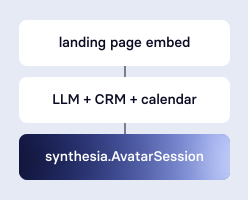
Inbound Sales & Demos
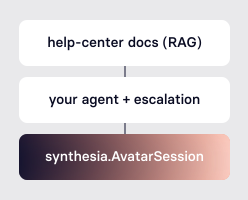

Customer Support
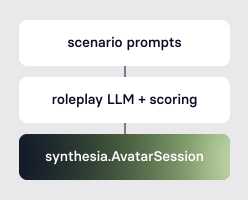

Training & Coaching
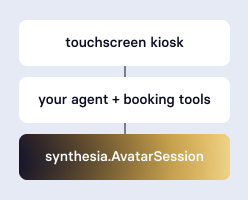

Kiosks & Concierge
Where a face changes the outcome
LiveKit plugin, bring your own LLM
Pipecat plugin
End-to-end, agent included
Start in minutes, scale when you're ready
Pay-as-you-go
$0.12/minuteStart instantly. Pay only for the minutes you use, no commitment, no minimum.
Interactive Avatar FAQs
What can I create using Interactive Avatars?
Interactive Avatars can power conversational experiences across products, websites, internal tools, training flows, support journeys, kiosks, and any other use case where a real-time, human face makes the interaction better.
Can I bring my own LLM?
Yes. Interactive Avatars is designed for teams that want to connect their own LLM, agent, or conversational logic and use Synthesia to power the avatar layer. You keep full control of the conversation; we handle the face.
How does the integration work?
The Synthesia Interactive Avatar is a plugin component you attach to your LiveKit Agent. Your agent produces speech the way it always does. The component routes that audio to the hosted avatar worker, which renders an expressive Interactive Avatar and publishes it to your LiveKit room as a regular participant. No changes to your frontend are needed.
Is this a public API?
Yes. Interactive Avatars is now generally available. Anyone with a Synthesia API key can get started using the developer documentation.
How do I get access?
Create an API key in your Synthesia workspace, install the LiveKit plugin, and follow our quickstart to begin building.
What are the current limitations?
The plugin currently supports Python LiveKit Agents only. We're continuing to improve expressiveness, listening behaviors, interruption handling, and latency, and will share updates soon.

Ready to build with Interactive Avatars?
Connect your own agent or conversational logic to Synthesia's Interactive Avatars.