How to Create Training Videos: A Step-by-Step Guide

Create engaging training videos in 160+ languages.
Anyone can make a training video in minutes, thanks to AI.
That's a pretty bold statement. But it's true. I, someone with absolutely zero video production experience, can sit on my couch and make a video in the same time it takes to make a morning cup of coffee.
Last year, we surveyed hundreds of L&D practitioners, and over half of them are using AI to make training videos.
But are these videos any good? Are they teaching someone to follow a process? Are they enabling skills?
AI has made it so easy to make training videos. But whether or not the training video drives measurable impact, that comes down to learning design.
What makes an effective training video?
Effective training videos have three things in common: a clearly-defined audience, a learning objective, and a measurable performance outcome.
(I'm assuming you've already conducted a needs assessment that's led you to determine that video is the right solution for the knowledge or skill gap you've identified.)
You likely have this information already, just not documented in an easily-referenced format. Before you do anything else, fill in this template:
This video is for [specific role] who currently [context or gap]. After watching this video, [specific role] should be able to [observable action] so that [business outcome].
You don't need to share it anywhere. It's how you'll benchmark whether or not the video was successful (more on that later).
How to create an employee training video
Once you have your learning objective and measurement goal documented, you're ready to start designing your training video.
Step 1: Write a script
Writing a script used to be the hardest part of creating a training video. Scripts are a specific medium, and getting the tone and word choice right takes practice. Depending on your audience, you might want a more formal or more conversational register. If you're planning to localize your video, you'll want to avoid idioms or any jargon that might lose its meaning in translation.
A good training video script is written for the ear, not the eye. I used to tell my writing students that they need to read their writing aloud to catch mistakes. That advice holds true for script-writing.
Avoid acronyms and jargon (unless you've clearly defined them) and words that aren't part of your regular vocabulary. If you went to a thesaurus for a word, cut it. And please build in breaks. Think about those terrible LinkedIn posts written like haikus. Short sentences, lots of space.
If you're struggling with a blank page, I have a guide to writing training scripts, which includes AI-assisted drafting tips and ready-to-use templates.
Step 2: Prepare for production
Once you have your script, you're ready to start creating the video. Before you do, I recommend writing out a punch list of assets you need. That can be guidance for a production crew or a list that you follow to bring everything together.
A typical punch list might include:
- The script (even if that's just a rough draft)
- Screen recordings, SOPs, or other reference materials
- Your company's brand guidelines (approved logos, colors, and fonts)
- Instructions for any SMEs
Let's say your sales team acquired a new CRM. They need training to support the change management process, not just why you got the tool, but what's changing for the team. That means overviews as well as role-specific workflow training. You need to gather all of that information for the punch list.
Step 3: Produce your video
At this point, you'll either be handing off production to a vendor or developing it yourself. If it's the latter, you'll need to decide on two things:
- How will the video be produced?
- How will it teach?
These decisions are often made based on the functionality of the tools you'll be using to create the video. If you have an eLearning software that only allows you to make training videos by narrating a slide deck, then the decisions are made for you. If, however, you have an AI video platform like Synthesia, you'll be able to consider a variety of production and instructional methods (more on that next).
You can find examples of production and instructional methods here.
Step 4: Edit and finalize
Once you have all of your components together in a first draft, it's time to get to the real work: editing your video. This is where learning design matters the most.
If this is your first time building a video, you probably spent a lot of time just getting everything into your software. Congratulations, I know how hard that can be. Now, you need to be rigorous about what makes the final cut.
- Every scene should earn its place. Get rid of anything that doesn't directly support the learning objective. Yes, even if it's genuinely interesting.
- Don't narrate everything on screen. Video works because it lets people process information through different channels at the same time. People don't need to be read to.
- Choose interactivity judiciously. Any interaction should be tied to the learning objective. A knowledge check or branching scenario should move learners forward towards behaving differently or practicing a decision they'll face on the job.
Finally, polish for publication. Add captions for accessibility, background music or b-roll, if appropriate, and do a final review to make sure the video does what your learning objective says it should.
Step 5: Publish and share the video
When you’re ready to publish the video, you need to make a plan for how you’ll maintain access and revise it when needed. That means thinking through three things:
- Where does the video live, and how will people find it?
- Who has access to the video, and what happens when it's shared?
- How will you update content without creating confusion (i.e., version control)?
Let's say you need to track completion rates for compliance reporting. Then you should publish your video in an LMS or comparable system that can be reported and audited. If your measurement goal is tied to daily work, consider distributing as an xAPI or mp4 in the flow of work: an intranet, a Slack channel, or wherever your team actually operates.
Step 6: Iterate on your content
A common mistake I see with video training production is spending too much time trying to get the video "just right" before getting any feedback.
Carve out time for a pilot. Gather together a small group of your target audience for a session where you watch them go through the video. See what lands, where they pause and rewatch, or where they have questions. You might be surprised at the feedback you receive, and grateful that you didn't spend more time refining b-roll footage that everyone said was distracting.
You can also do this asynchronously. Send the video and a shortlist of narrow questions:
- Not: "Did you learn something?"
- Instead: "Did the step-by-step workflow make sense? Why or why not?"
If you're struggling to figure out what isn't working, go back to the learning objectives you defined. Confirm every scene supports that objective.
How to create an employee training video with AI
I started this guide telling you that you could make a training video in the same time it takes me to make my coffee. (I pour cold brew straight into a cup and add ice if I'm feeling fancy. That's the kind of timeline I had in mind.)
But I made no promises about the quality of that training. Now that you've seen the learning design behind effective training videos, let's talk about how an AI platform like Synthesia can help you cut down on production time and the skills needed to get there.
You can direct the AI to design your video, provided you have the right inputs. And if you've been following along, you know what those are: your audience, your outcome, and how you'll measure impact.
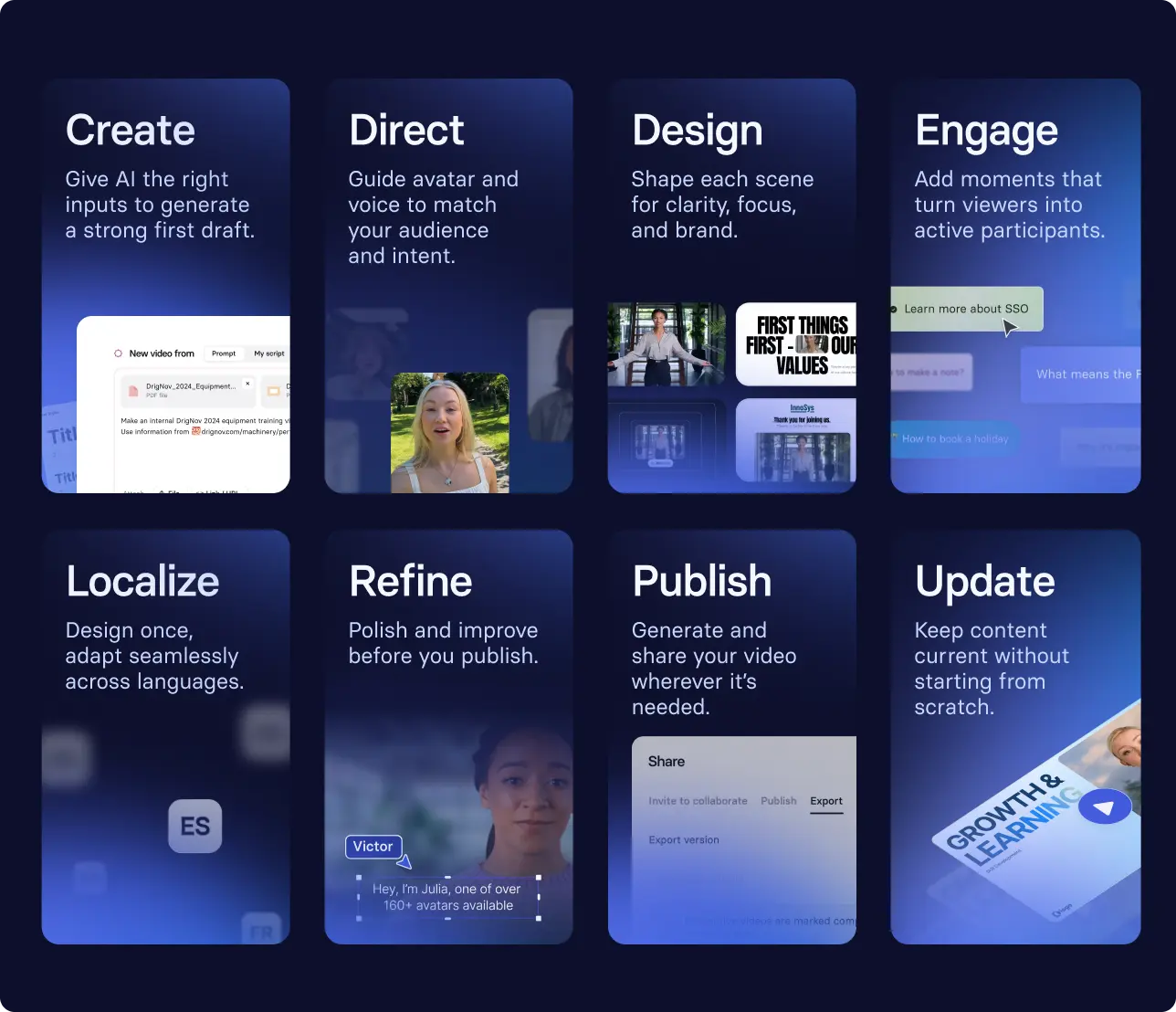
From there, you're not following a linear process. You're moving between different parts of the design depending on what the video needs. That might look like:
- Uploading a script into our AI video generator to generate a first draft of your video
- Selecting an avatar, customizing their voice, pronunciation, clothing, and environment with our Assistant
- Adding an interaction, like a branching scenario that encourages the viewer to apply what they're learning
- Reviewing a scene, then reshaping the structure or visuals to make it clearer
- Publishing your video, then localizing it with a few clicks into the languages your employees speak
With version control, you can always come back and refine as things change.
If you’re interested in seeing how an enterprise is creating training videos at scale, hear from Brink’s.
How to measure training video effectiveness
At some point, someone is going to ask whether the investment in video training was worth it, especially if you're paying a vendor or acquiring a new tool. That's why I had you write down your learning objective and measurable business outcome at the beginning of this process.
To determine whether the move to video was worth it, you have a few options. If you offered the training previously in another format (say a course or one-pager), you can compare the impact on the business outcome by medium. If you're creating a brand new training, you can conduct a before and after test around the training launch.
Either approach requires you to collect a few different data sources. The first are snapshot metrics, things like completion rates or passing rates on an assessment. The second are impact measurements — metrics the business cares about, often tied to KPIs.
In the example I gave earlier about senior leaders struggling to align on product features, I would look at the effectiveness of the video and workshop over a period of time, like a quarter. I would check in after the workshop and then again at the end of the quarter. In this case, priority alignment might show up in qualitative data (like agreement in messages or other decision-making spaces), as well as faster releases or similar signals. You can partner with your stakeholders to understand what metric they're looking to move.
The goal is good enough measurement that tells you whether you should continue making training videos, or whether something needs to change for them to be effective in your workplace.
If you're ready to create a video training, head to our free AI video generator tool to get started. Watch a brief overview of what this process looks like end-to-end.
Amy Vidor, PhD, is the Learning and Development Evangelist at Synthesia, where she researches learning trends and helps organizations apply AI at scale. With 15 years of experience, she has advised companies, governments, and universities on skills.
Frequently asked questions
What is a training video?
A training video is a short, role-specific video. They can be educational or informational, meaning they are designed to change what someone knows or what they can do.
How long should a training video be?
There is no "right" length for a training video. That being said, I recommend videos be no longer than 6-8 minutes in length. In workplace research, engagement tends to decrease for videos longer than that. Remember, you can always have a series of videos if your topic needs more time.
What should be included in a training video?
All training videos should include the learning objective. Phrase it in a way that resonates with your audience. Why are they spending their precious time watching this video? What's in it for them?
How do you create a training video in minutes?
You can create a first draft of a video with a few clicks. Go to Synthesia's AI video generator, upload a prompt or any existing materials you may have (e.g., a one-pager, slide deck, or transcript from a recorded training). Then, generate your video. Don't forget to revise!


.webp)