Avatars
Improvement
Customize avatars with more control
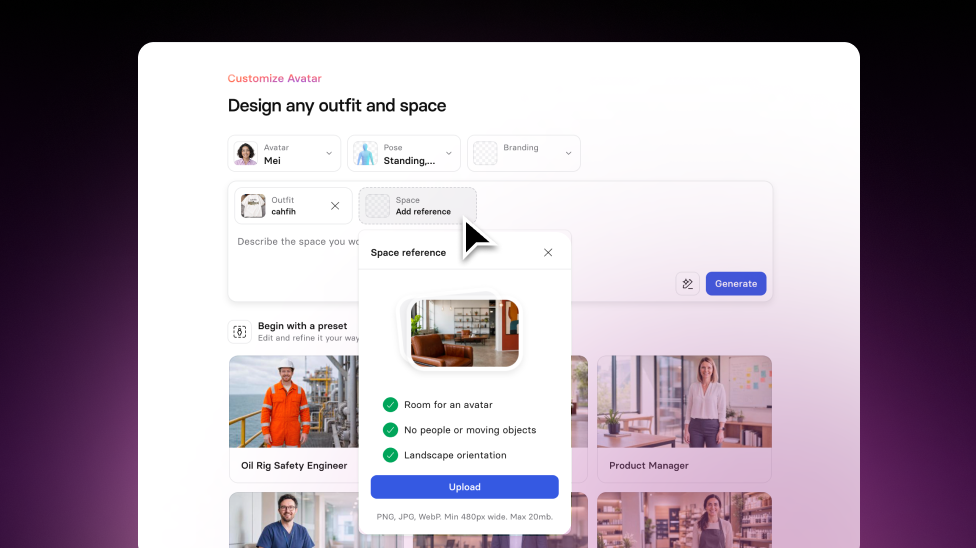
A new, more visual Avatar customization flow with improved realism, brand-ready styling, and better composition controls.
See what Synthesia can do for you
See all updates
Today, we’re introducing Avatar Customization 2.0: a more visual way to create Avatar outfits and Spaces, with better realism and more control over how your Avatar fits into your scene. Available on all plans.
How it works and why it matters
Avatar Customization now puts inspiration and composition first, so it’s faster to find a look you like and make it work in your layout.
- Improved visuals (lighting, contrast, and color) for more realistic results
- Coordinated styling that can automatically apply your Brand Kit to outfits and Spaces (Enterprise only)
- New pose and composition options, including seated Avatars and left/right positioning
- Edit outfits and Spaces with prompts to fine-tune the result
- Creators in Enterprise workspaces can also upload a reference image for an outfit or Space, so your Avatar can match a real environment (like your office or store) or a specific uniform
- This helps your videos feel more true-to-life and relatable
- It also saves time: instead of writing prompts, you can upload what you need and get a ready-to-use Avatar in minutes
For more on how it works, check out our knowledge base.
More updates
See all updates
Enterprise
Keep layouts looking polished for your translated videos
Translate videos without text overflow—translations adapt to each text box, and long strings scale down to keep your slides looking polished.
8/21/26
.png)
Get the skills, insights, and support to help you scale





