Bookmark and share any settings panel
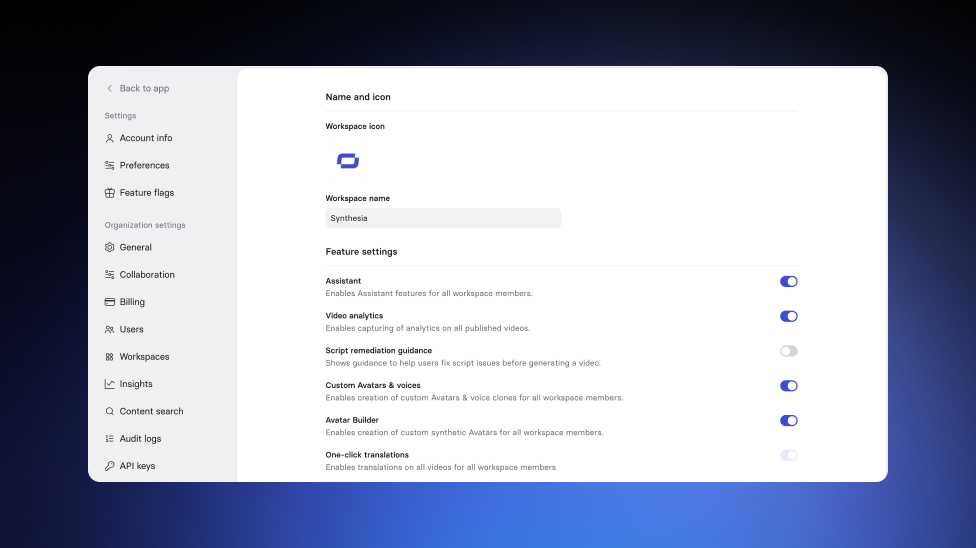
Settings now opens as a full page with its own sidebar, and every panel has a link, so everyday admin work no longer means reopening a dialog.
See what Synthesia can do for you
If you’re a Synthesia workspace or organization admin, you probably spend a good bit of your time on our platform in Settings. Now Settings opens as a full page instead of a pop-up, so it's easier to get around and get back to where you left off.
Go ahead and try it, you can open up your settings from this link.
What's new
Before, Settings opened in a dialog, and most panels didn't have their own link. Now you can:
- Navigate from the sidebar to any settings panel
- Bookmark or share a direct link to a specific panel
- Reload the page and stay on the same panel
- Use browser Back to return to the previous panel
- Jump straight to the right panel from links in our emails and billing pages
This is especially helpful when you're an admin handling users, seats, SSO, audit logs, and API keys every day. On mobile, you'll find the settings navigation in the menu drawer.
More updates

Make cinematic Syren videos with Seedance
Choose cinematic mode when Syren suggests it, and Seedance builds higher-quality, lifelike scenes, so your video feels like a real production.
Get the skills, insights, and support to help you scale