Find the right voice faster with the refreshed voice picker
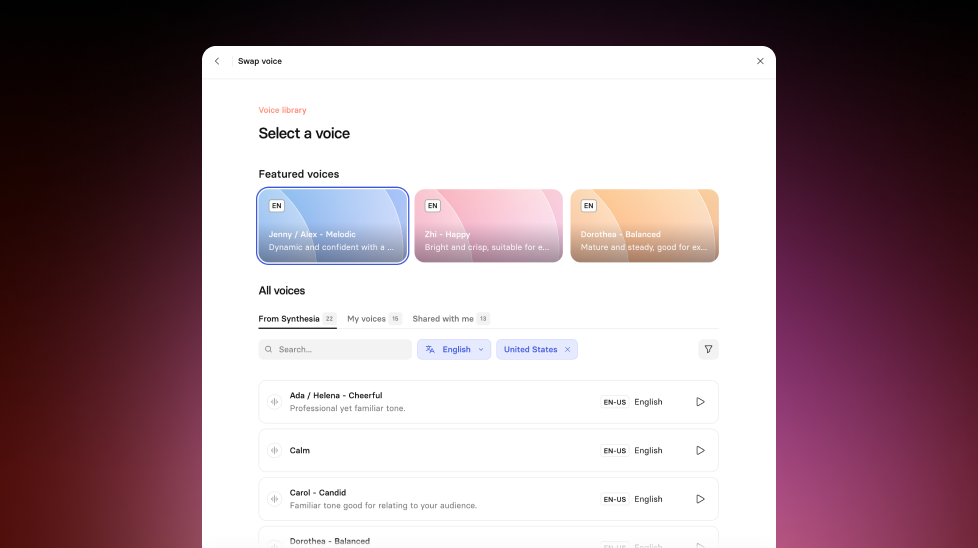
Browse Featured voices, filter by language or accent, and preview instantly, all in a bigger, easier-to-scan voice picker.
See what Synthesia can do for you
Today, we're introducing a refreshed voice picker—bigger, easier to scan, and built for browsing when you don't already know exactly which voice you want.
What’s new
The old picker was a compact dropdown—fine once you knew the voice you wanted, but cramped for actually browsing a large catalog.
The new picker opens as a full page instead. You'll find Featured voices (our picks) right at the top, or you can explore everything across three tabs: From Synthesia, My voices, and Shared with me, each showing how many voices are available.
What you can do
- Search by name, filter by language or accent, or sort the list to narrow things down fast
- Press play on any voice row, or use the sticky preview bar at the bottom (with waveform) to audition a voice without losing your place
- Swap voices directly from the list with the "+" button on each row, instead of opening one first
- Switch between Synthesia's voices, your own, and ones shared with you
For more on how it works, check out our documentation.
More updates

Make cinematic Syren videos with Seedance
Choose cinematic mode when Syren suggests it, and Seedance builds higher-quality, lifelike scenes, so your video feels like a real production.

Get the skills, insights, and support to help you scale