Enterprise
New Feature
Keep translations consistent with a glossary
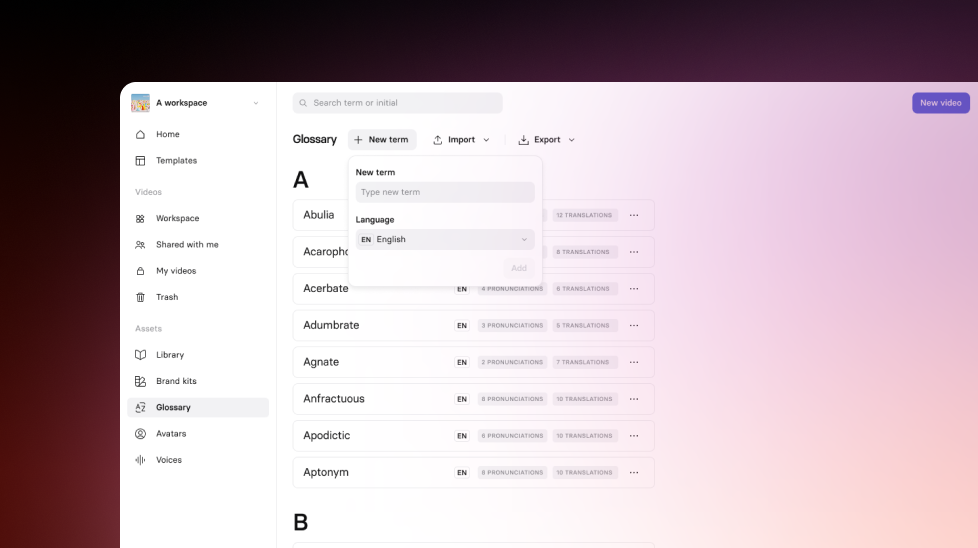
Define a workspace translation glossary for key terms, acronyms, and brand names.
See what Synthesia can do for you
See all updates
Today, we’re introducing Translation Glossary — so your company, product, and industry terms stay consistent across languages. Available for creators on Enterprise plans.
How it works and why it matters
You can now define a workspace-level glossary to control how specific terms are handled in translations.
- Override how a term is translated (per language, and even per locale)
- Mark terms as do not translate (great for acronyms and brand names)
- Import and manage terms in bulk via CSV
Glossary rules apply to new translations, which reduces manual cleanup and helps teams scale multilingual video faster.
For more on how it works, check out our knowledge base.
More updates
See all updates
Enterprise
Keep layouts looking polished for your translated videos
Translate videos without text overflow—translations adapt to each text box, and long strings scale down to keep your slides looking polished.
8/21/26
.png)
Get the skills, insights, and support to help you scale





