New Feature
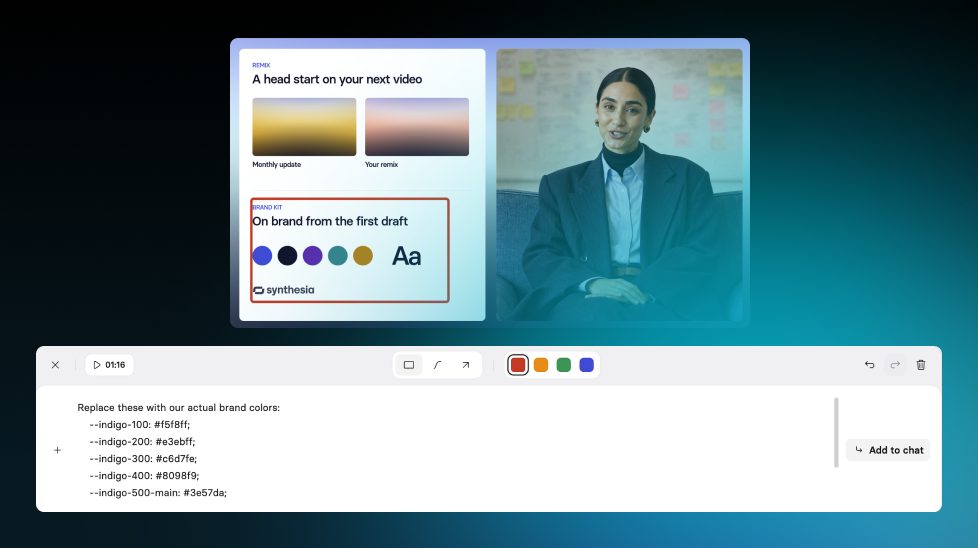
Mark up frames to show Syren what to change
Draw on your video, describe each edit, and send them all to Syren in one message, so fewer changes come back wrong and you skip the back-and-forth.
See what Synthesia can do for you
See all updates
Describing a visual change in words can take a few tries. Now you can point at it instead.
What's new
Before, every edit had to be explained in the chat. Now you can:
- Annotate: pick Annotate from the toolbar under your video, then draw with the pen or a rectangle in the color of your choice
- Add images: attach up to four images to show what you have in mind
- Add to chat: queue each change in the chat box, then send them all to Syren in one message
- Track every change: see each one as a numbered chip, and get an update from Syren on each by number
This is especially helpful when you're fine-tuning layouts, text, or visuals and want to get there in fewer rounds.
More updates
See all updates

Improvement
Make cinematic Syren videos with Seedance
Choose cinematic mode when Syren suggests it, and Seedance builds higher-quality, lifelike scenes, so your video feels like a real production.
11/10/26
Get the skills, insights, and support to help you scale