Free Training Video Script Templates (+ AI Script Generator)

Create engaging training videos in 160+ languages.
Years ago, I taught writing to university students. At the start of each term, I’d ask everyone to introduce themselves and share something they practiced (a musical instrument, a sport, something else entirely). And then, I’d cover the course syllabus, explaining how writing, much like the hobbies shared, requires repeated practice and feedback to improve.
The good news is, this isn’t a course, and I don’t need to explain how employee training video scripts are a genre with their own conventions and quirks.
That’s because you no longer have to spend hours staring at a blank screen, cleverly adapting and condensing content into a training video script. Instead, you can use AI.
But don’t worry, if you truly want to write your script from scratch, I’m also including some templates and best practices to jumpstart the process.
Before drafting your script
Before you can write a training script, you need to do one thing first. And yes, it involves writing. You need to complete this sentence:
This video is for [specific role] who currently [context or gap]. After watching, [specific role] should be able to [observable action] so that [business outcome].
Effective training video scripts are grounded in learning design. (So promise me you’ve already conducted a needs analysis, okay?) That means you know your audience, the performance gap they’re facing, and how addressing it will impact something the business cares about.
It also means distributing the cognitive load between auditory and visual pathways, you don't need to narrate everything you show, and you don't need to show everything you narrate. Draft your script accordingly.
Draft your script with AI
Okay, now that we have that out of the way, here are two ways you can draft your script with AI.
Option 1
Use a free AI script generator.
Open the link, copy and paste the sentence you wrote down above, select a tone of voice and output language, and hit generate. Voilà, a first draft.
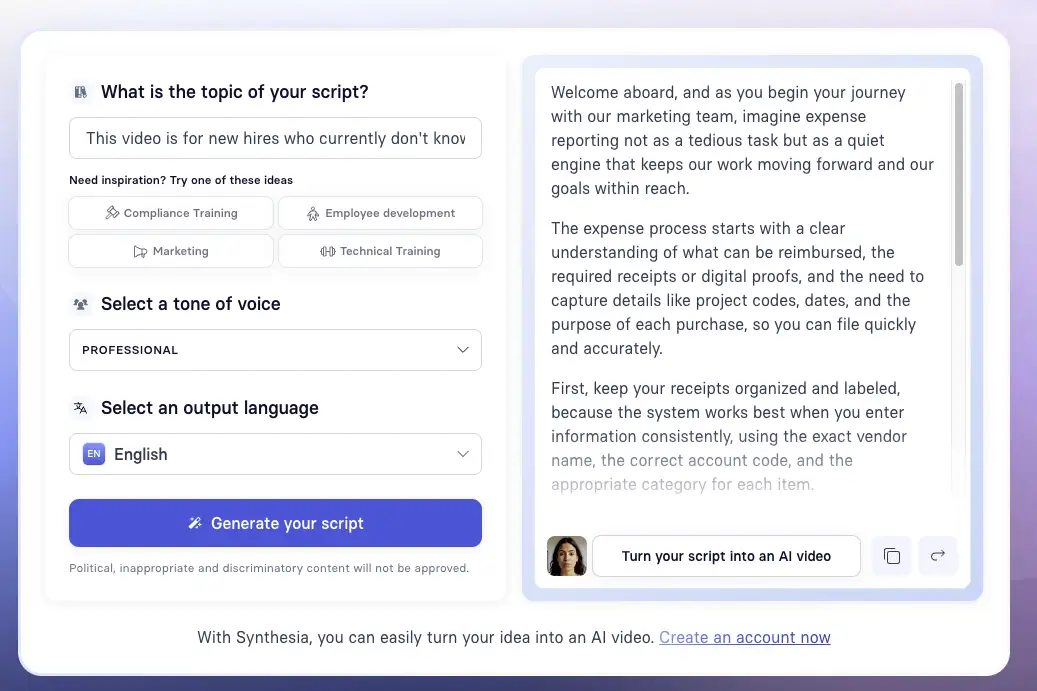
If you’re wondering, here’s what I used in the example above to get this output.
This video is for new hires who currently don't know the company's expense reporting process or what's reimbursable. After watching, new hires should be able to submit a correctly completed expense report within the approved tool so that finance teams don't have to chase corrections and reimbursements are processed on time.
Option 2
If you’re looking for a more collaborative approach to writing a script, you can use an LLM to write a draft. To do this, go to whichever LLM is approved by your company. Then, write a structured prompt with the statement you drafted above.
One framework for writing structured prompts is CIDI:
- Context — Give the LLM a role and enough information to understand the scope of the task.
- Instructions — Provide step-by-step instructions of how you want the task to be performed.
- Details — Include any constraints that will guide the style or quality of the script.
- Input — Attach any relevant materials the LLM should reference.
I've drafted an example of a CIDI prompt below so that you can customize it for yourself.
No matter which option you choose, treat the output as a first draft. Take the time to revise the script. I recommend reading aloud (or having a Google Doc read to you) to catch any awkward sentence structures or word choice that feels off.
Don't hesitate to give the LLM feedback, and ask it what it can do better, and then have it do so.
Draft your script with a template
Alternatively, you can get started with a template, which can be as prescriptive as you want it to be.
In my experience, video training scripts are most compelling when they’re well-organized. Depending on the use case, that may include the following components:
- Hook
Why someone is spending their precious time on this training - Outcome
What will someone be able to do immediately after? - Step-by-step instructions
The minimum number of steps to complete the task or make the decision - Pitfalls
Common mistakes and how to avoid them - Next action
What someone does next, and how they get help if needed
The templates below are modeled around the best practices for writing training video scripts. They’re not designed to be exhaustive, just a starting point for making your training video.
In each template, you'll find a template followed by a completed example based on a specific scenario and learning objective. The templates are linked in the headers (e.g., 'Universal'), so click on them to open.
Universal
This template is use-case agnostic. Use it if you're unsure what type of training video you want to create, or if your use case isn't listed below.
Employee onboarding
Whether you're looking to welcome new hires, introduce them to your company culture, or offer them role-specific onboarding, this template can adapt to your onboarding video needs.
Leadership training
If you're trying to design a scenario-based training video, this template can help you draft scenario-based training with decision points and feedback embedded.
Safety
When our clients are making training videos on safety topics, they're usually building off of an SOP. That's why this template is structured around a procedure or protocol, with a scenario and decision point built in to show the consequence of getting it wrong.
Once you've drafted your script, you can try out our free AI video generator to see how this comes together in minutes.
Amy Vidor, PhD, is the Learning and Development Evangelist at Synthesia, where she researches learning trends and helps organizations apply AI at scale. With 15 years of experience, she has advised companies, governments, and universities on skills.


.webp)